
Healthcare leaders aren't buying revenue cycle management software because it's fashionable. They're buying it because the financial stakes are too high to keep running on fragmented workflows. The global Revenue Cycle Management market is projected to grow from US$ 102.16 billion in 2024 to US$ 291.19 billion by 2033, a projected 12.4% CAGR, according to DataM Intelligence via PR Newswire.
That number matters less as market trivia and more as a signal. Practices, physician groups, and health systems are under pressure to collect faster, reduce denials, tighten front-end accuracy, and operate with less tolerance for billing friction. In that environment, revenue cycle management software stops being a back-office purchase. It becomes a financial control system.
The mistake I see most often is that leadership teams evaluate software by feature list alone. They compare dashboards, automation claims, and user interface screenshots, then miss the two issues that decide whether the investment works: total cost of ownership and who handles the claims that automation can't.
Table of Contents
- The Undeniable Rise of RCM Technology
- Deconstructing RCM Software Core Components
- Quantifying the ROI of Modern RCM Investments
- Your Vendor Evaluation and Due Diligence Checklist
- Navigating Implementation and Change Management
- In-House Software vs A Full-Service RCM Partnership
- Building a Financially Resilient Practice for 2026 and Beyond
The Undeniable Rise of RCM Technology
The growth in this category reflects a simple reality. Healthcare organizations need tighter control over reimbursement, patient collections, and administrative effort. Revenue cycle management software sits at the point where clinical activity becomes financial outcome.
RCM software serves as the system that manages the financial processes tied to patient care. It covers patient registration, appointment scheduling, billing, claims processing, and revenue collection while connecting administrative and clinical data so teams can submit cleaner claims, manage accounts receivable, and reduce denial risk, as described in this market definition of healthcare RCM software.
That definition sounds straightforward. The operational reality is not.
A practice can deliver excellent care and still underperform financially if the front desk captures incomplete insurance data, if coding lags behind encounters, if staff work denials too late, or if patient balances age without structured follow-up. Software matters because it coordinates those handoffs. When it's implemented well, staff spend less time chasing avoidable errors and more time resolving issues that require judgment.
Why leadership teams are treating RCM as infrastructure
CFOs and CEOs increasingly view revenue cycle management software the same way they view an EHR, a payroll platform, or a general ledger system. It's not optional infrastructure. It's operational plumbing.
Three business needs usually drive the purchase:
- Revenue protection: The software helps identify where money is leaking across registration, coding, claims, denials, and patient collections.
- Administrative compression: Automation can remove repetitive work from claim submission, payment posting, and status tracking.
- Decision visibility: Leadership needs a reliable view of A/R, denials, payment trends, and workflow bottlenecks.
Practical rule: If your team can't see where claims stall, where denials originate, and where balances age, you don't have a software problem alone. You have a management visibility problem.
The leaders who get the most value from RCM technology don't ask only, “What features are included?” They ask, “Which workflows become more reliable, which metrics should move, and what expertise is still required after the software goes live?”
Deconstructing RCM Software Core Components
Every dollar collected passes through a chain of handoffs. Revenue cycle software matters because it controls those handoffs, records where they break, and helps staff correct problems before they turn into write-offs or aged A/R.
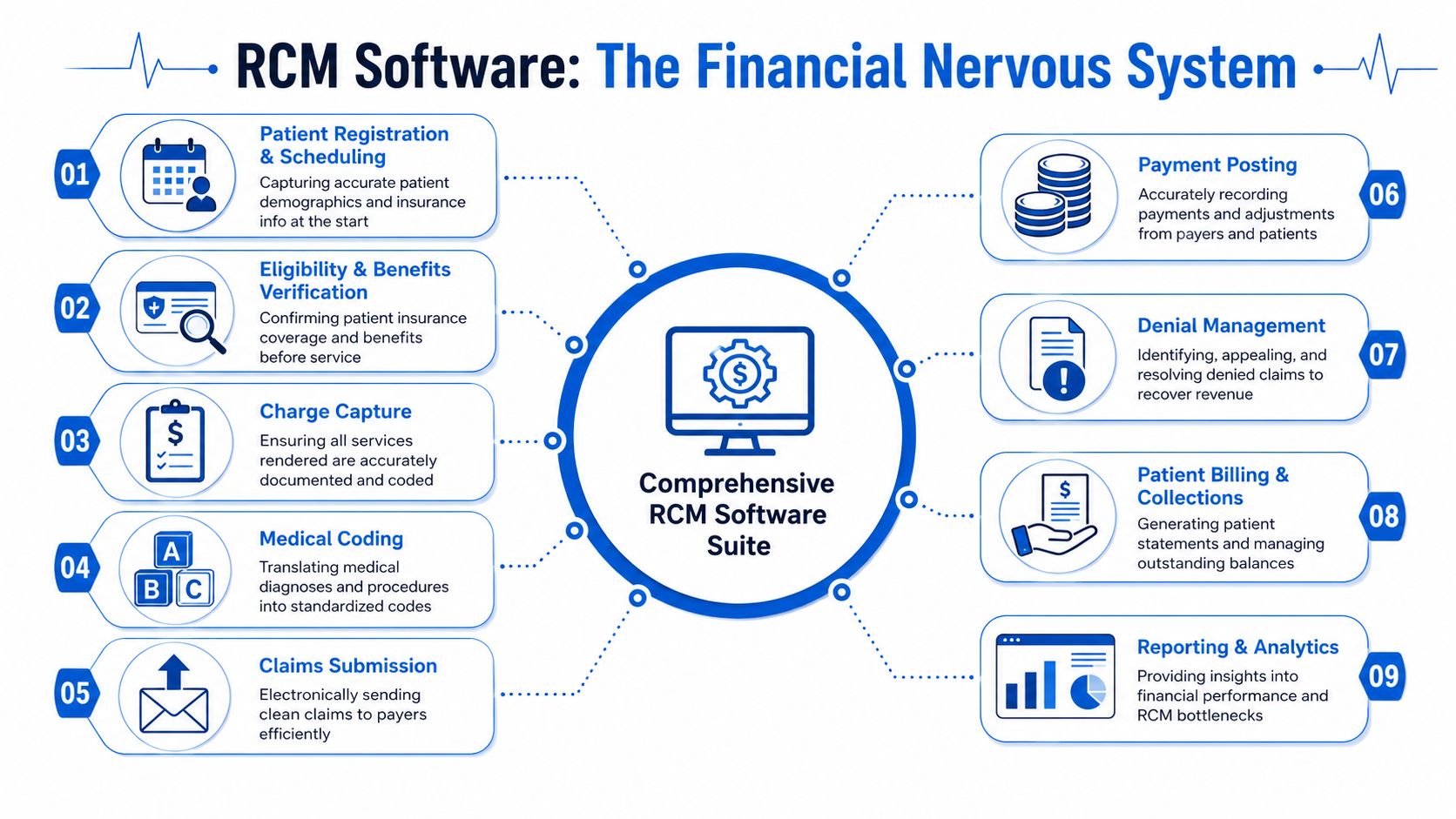
A strong RCM platform ties together scheduling, registration, eligibility, charge capture, coding, claims, payment posting, denial follow-up, patient billing, reporting, and compliance controls. The test is not whether all of those modules exist on a sales sheet. The test is whether they share data cleanly, reduce manual rework, and give managers enough visibility to intervene early. That is also where Total Cost of Ownership starts to show up. A lower subscription fee means little if staff still export spreadsheets, rekey payer responses, or work denials outside the system.
Where the cycle actually starts
Most practices lose margin before a claim is ever created.
Front-end tools set the financial quality of the encounter. If registration is inaccurate, if eligibility responses are hard to interpret, or if referral requirements are missed, the back office inherits preventable cleanup work.
- Patient registration and scheduling: The system should capture demographics, insurance details, referral information, and authorization requirements accurately the first time. Weak front-end workflows increase denial volume and staff rework later.
- Eligibility and benefits verification: Real-time verification needs to fit into daily intake operations. If staff jump between portals or manually interpret inconsistent payer responses, the software is pushing labor cost back onto the practice.
- Charge capture and coding support: These tools should help clinicians and coding staff turn documented care into billable charges without delay. The trade-off is important here. More edits can improve accuracy, but they can also slow claim release if the workflow is poorly configured.
Short version: weak intake raises cost-to-collect.
Where payment is won or lost
After the visit, the software has two jobs. Move clean claims out quickly. Surface exceptions early enough for staff to act.
| Component | What it should do | What happens when it fails |
|---|---|---|
| Claims submission | Scrub and transmit clean claims efficiently | Rejections, delays, rework |
| Payment posting | Record remits and patient payments accurately | Distorted A/R, bad follow-up priorities |
| Denial management | Route, categorize, and support appeals | Preventable revenue loss |
| Patient billing and collections | Produce understandable statements and follow-up workflows | Slower collections, staff burden |
The best systems connect these functions instead of treating them as separate tasks. A denial reason should feed claim edit rules. Underpayments should be visible by payer and contract terms. Posting variances should trigger follow-up queues, not sit in a report that no one owns.
That connection matters because automation always has gaps. Software can flag a denial, but it cannot always judge whether the root cause was documentation, registration, coding, payer policy, or contract configuration. Practices still need experienced staff to work the exceptions that software cannot resolve on its own. Leadership teams that ignore that labor requirement often underestimate TCO and overestimate ROI.
For groups that want tighter management discipline, healthcare revenue cycle analytics should be treated as an operating tool, not just a reporting add-on. The value comes from turning claim, payment, denial, and aging data into assigned actions.
The best claims workflow prevents avoidable rework before submission and gets the right exceptions to the right people fast.
Why reporting deserves equal weight
Analytics determines whether leadership can manage the cycle with precision or just react to month-end surprises.
Useful reporting should answer questions such as:
- Where are denials clustering? By payer, provider, location, specialty, or denial reason.
- Which balances are aging? Not just total A/R, but where follow-up stalls.
- Which workflows are unstable? Eligibility misses, charge lag, posting backlog, underpayment patterns.
- Which teams need intervention? Software should support management, not replace it.
This is also where many buying teams make an expensive mistake. They compare features but do not ask how much analyst time, supervisor review, and manual queue management the platform still requires. A dashboard that looks polished in a demo can still leave managers doing offline reconciliation every week. That labor cost belongs in the software decision.
Compliance tools belong in the same evaluation. Audit trails, role-based access, payer rule updates, and workflow controls protect cash in a different way. They reduce the chance that a process shortcut creates repayment risk, appeal weakness, or avoidable exposure during an audit.
Quantifying the ROI of Modern RCM Investments
RCM software should be judged the same way any capital or operating investment is judged. Leadership needs to know which financial metrics should improve, how quickly they should become more stable, and what operational changes are required to get there.
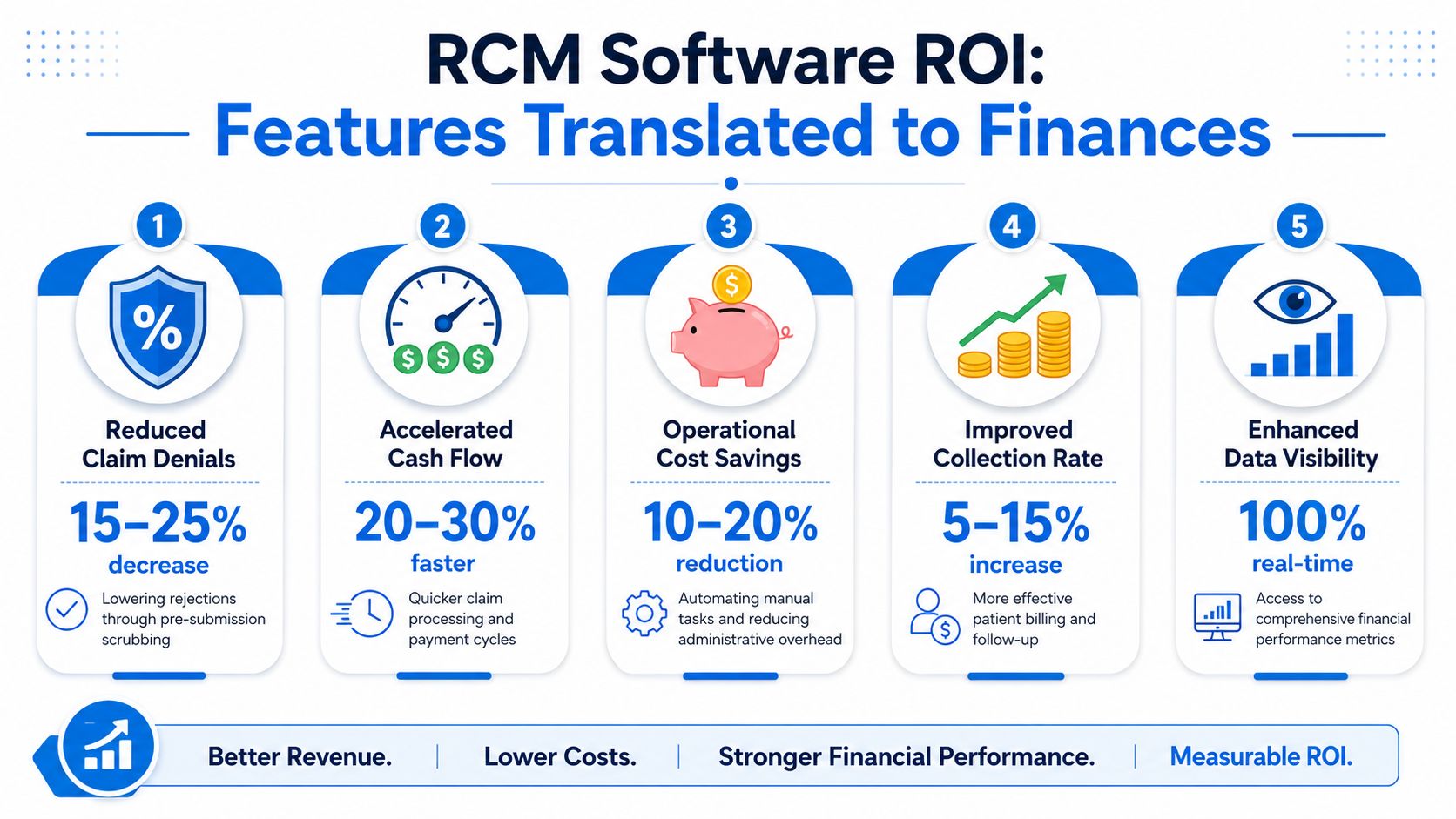
The cleanest way to evaluate ROI is through a handful of revenue cycle benchmarks. According to Medical Billers and Coders benchmark guidance, best-in-class practices achieve a Net Collection Ratio of 98–100%, a Denial Rate below 4%, clean claim rates exceeding 95%, and can reduce Days in A/R from the average 30–40 days to 25 days or less when automation and real-time analytics are used well.
A second benchmark set from MD Clarity's RCM benchmark review adds the broader financial picture. Best-in-class RCM software supports a cost-to-collect ratio below 3–4% of net revenue, a bad debt ratio under 3%, no more than 10–15% of A/R beyond 90 days, a collection effectiveness index of 95% or higher, and a first-pass resolution rate above 90%.
The KPI lens leadership should use
Not every KPI carries the same management value.
- Denial rate tells you whether front-end accuracy, documentation, and claim edits are doing their job.
- Days in A/R shows whether cash is moving or stalling.
- First-pass resolution rate reveals whether claims are leaving the door clean.
- Cost to collect measures whether your process is financially efficient, not just active.
- Net collection performance helps leadership see how much collectible revenue is reaching the bank. For teams focused on that metric specifically, this guide to net collection rate is useful background.
What good software changes financially
The ROI doesn't come from “automation” as an abstract concept. It comes from matching the right function to the right pain point.
Consider the chain of effect:
- Real-time eligibility verification catches coverage issues before service or before claim submission.
- Cleaner intake and coding data reduces preventable payer edits.
- Automated claim status tracking shortens the time claims sit untouched.
- Structured denial workflows help staff work the right accounts in the right order.
- Dashboards by payer and specialty let leadership target root causes instead of reacting broadly.
Below is a useful way to frame that relationship.
| Software capability | Operational effect | Financial effect |
|---|---|---|
| Eligibility automation | Fewer front-end errors | Lower denial pressure |
| Claim scrubbing and tracking | Less rework and delay | Faster cash movement |
| Payment posting visibility | Better reconciliation | Cleaner A/R management |
| Denial analytics | Faster root-cause correction | Higher recoverable revenue capture |
A short explainer on the operational side is worth watching here:
How to build a practical ROI case
Don't build the business case around vendor promises. Build it around your current failure points.
If denials are high, ask which denial categories the software can prevent, which it can route, and which still require expert review.
A credible internal ROI model usually starts with these questions:
- Which tasks are consuming skilled labor unnecessarily?
- Where are claims aging because no one has timely visibility?
- Which denials are preventable versus recoverable?
- Will the software improve workflows enough to offset its direct and indirect cost?
That last point matters. A platform can hit benchmark-level metrics on paper and still disappoint financially if the practice underinvests in training, workflow redesign, or follow-up staffing.
Your Vendor Evaluation and Due Diligence Checklist
Most RCM purchases don't fail because the software lacks features. They fail because buyers accept vague answers about scope, service model, and cost.
One question exposes more risk than almost any other: what sits inside the price and what triggers an extra charge? According to this RCM vendor pricing and scope discussion, vague scope definitions can lead to 10-15% unexpected budget overruns for mid-sized practices when denial work, custom reporting, or complex A/R follow-up falls outside the base agreement.
The questions that expose hidden costs
A polished demo won't answer the hard questions. Procurement needs to push deeper.
Ask the vendor to define, in writing:
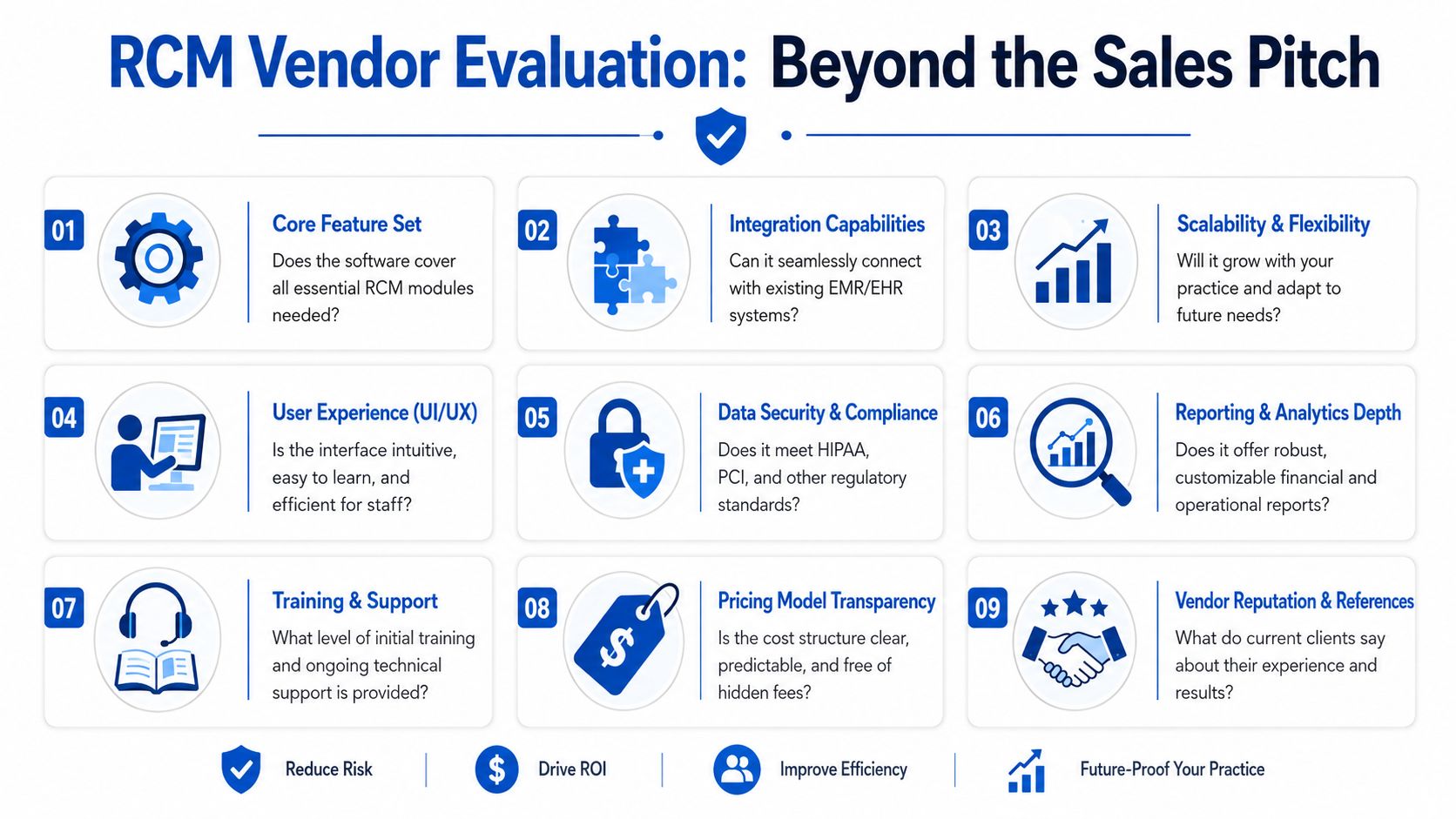
- Included workflow scope: Does the base price cover only core claim submission, or also denial rework, payer follow-up, custom reports, and aged A/R support?
- Implementation services: What training, configuration, data migration, and testing are included?
- Support model: Is support limited to technical issues, or does it include workflow guidance?
- Reporting limits: Are dashboards configurable without extra fees?
- Edge-case handling: What happens when automation fails on atypical claims?
These questions matter because many contracts look affordable until work begins to spill into “exceptions,” “professional services,” or “advanced support.”
What to verify before you sign
Use a structured evaluation process. Don't rely on a finalist scorecard built only around features.
| Evaluation area | What to confirm |
|---|---|
| Integration | How the platform connects to your EHR, PM, and payer workflows |
| Usability | Whether front-desk, billing, and management teams can work efficiently in it |
| Reporting depth | Whether data can be segmented by payer, specialty, provider, and aging category |
| Support quality | Who answers questions after go-live and how issues are escalated |
| Pricing clarity | What is fixed, variable, excluded, or billed separately |
Due diligence note: If a vendor can't explain how costs expand when claims become more complex, you don't yet know the real price of the platform.
Reference checks should focus on operational truth, not general satisfaction. Ask current clients what happened after onboarding. Ask whether the reporting became actionable. Ask whether the vendor stayed accountable when denials rose, interfaces broke, or workflows required redesign.
One more point. Buyers often compare software products as if they're buying technology alone. In practice, they're choosing an operating model. That means your evaluation should test not only what the system can do, but also what the vendor will do when normal workflows break.
Navigating Implementation and Change Management
A weak implementation can make strong software look ineffective. Most post-purchase frustration comes from workflow disruption, unclear ownership, and rushed training, not from the platform itself.
Leadership should treat implementation as an operational redesign project. The system will change how the front desk verifies coverage, how coders handle work queues, how billers prioritize denials, and how managers review financial performance. If those changes aren't planned explicitly, staff fall back into old habits and the software becomes an expensive layer on top of broken process.
Treat rollout as workflow redesign
Start with current-state mapping. Identify where data enters, where work queues form, where manual touches happen, and where claims leave the system with avoidable defects.
Then stage the rollout in a way that protects revenue continuity. Many organizations do better when they sequence major functions rather than changing everything at once. Registration discipline, eligibility workflow, claim edits, posting, and denial routing each need operational ownership.
Useful implementation checkpoints include:
- Front-end accuracy standards: Define what information must be captured before a visit is considered registration-complete.
- Queue ownership: Assign named teams or roles to each claim status, denial category, and unresolved balance bucket.
- Escalation paths: Decide when issues stay with staff and when managers intervene.
- Post-go-live review cadence: Review workflow failures early and often while habits are still forming.
Train for exceptions not just tasks
Many vendor training programs show users where to click. That isn't enough.
Staff need scenario-based training tied to real work. Front-desk teams should know how to respond when eligibility returns inconsistent data. Billing teams should know how to triage denials by recoverability. Managers should know which dashboard signals require immediate action and which ones reflect lagging data.
Systems don't fail because staff can't find the right screen. They fail because no one agrees on what to do when the screen shows a problem.
Training should also be role-specific. A physician leader, a practice administrator, and a payment poster don't need the same level of system depth. They do need shared expectations around documentation quality, timeliness, and accountability.
Set governance early
Implementation improves when one leadership group owns the outcome. That group should include finance, operations, and the people closest to daily billing work.
Governance decisions should cover:
- Metric ownership: Who owns denial rate, A/R aging, posting lag, and registration accuracy.
- Change control: Who approves workflow edits, rule changes, and report modifications.
- Issue resolution: How interface problems, payer rule changes, and user workarounds are surfaced and corrected.
The practices that get value fastest are usually not the ones with the flashiest technology. They're the ones that make operational discipline part of the rollout.
In-House Software vs A Full-Service RCM Partnership
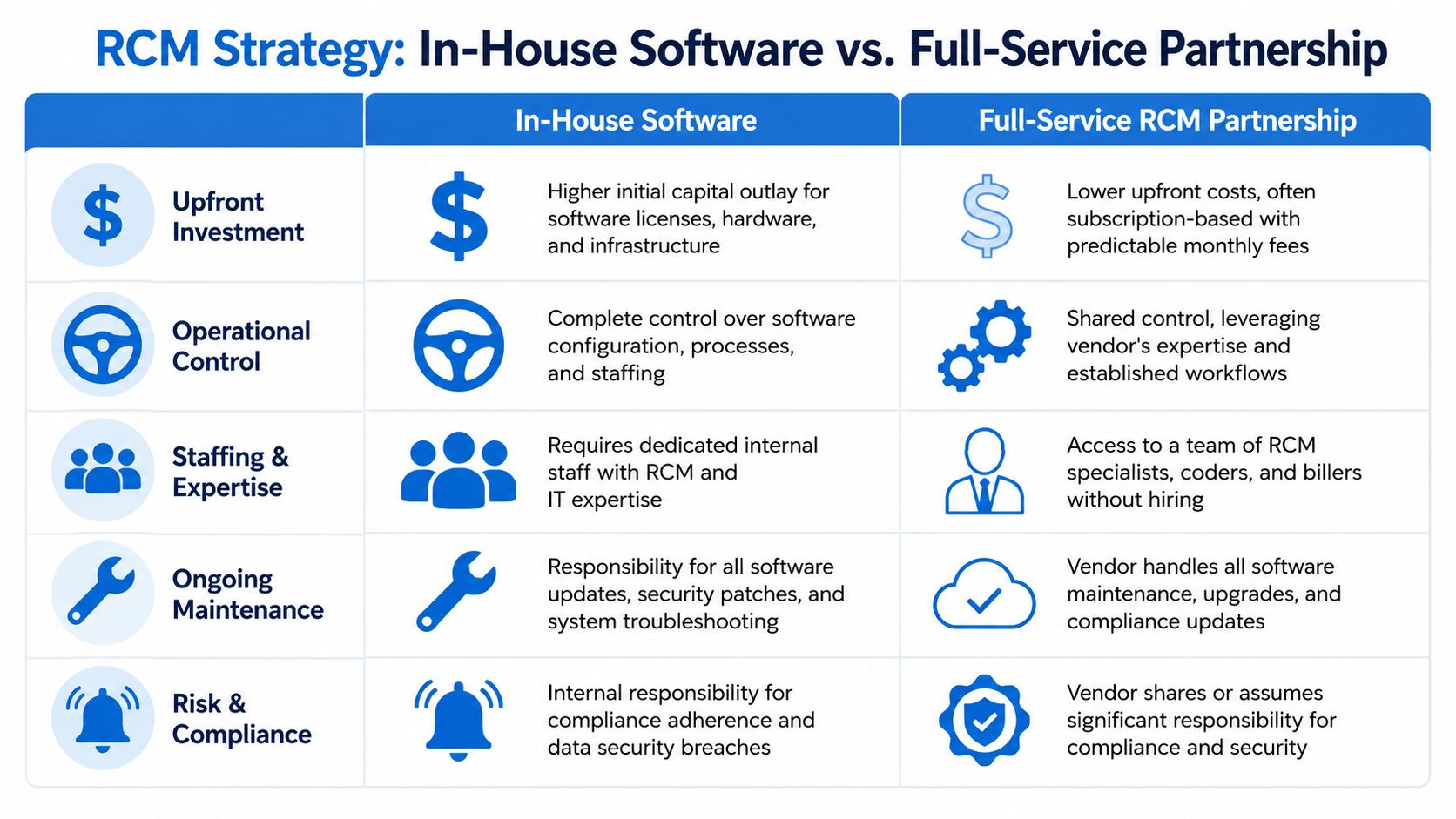
Practices do not lose revenue only because they picked the wrong platform. They lose revenue because leadership underestimates the full operating cost of running revenue cycle work well after the software goes live.
That is the decision underneath this comparison. Is the goal to give an internal team better tools, or to transfer part of the execution burden to a partner with payer follow-up, denial management, and A/R recovery expertise already in place?
Where in-house works well
In-house software performs best when the practice has enough management depth to run RCM as an operating function, not just a technology purchase.
That usually includes:
- Clear ownership of financial outcomes: One leader is accountable for front-end accuracy, coding timeliness, denial trends, cash posting, and follow-up productivity.
- Reliable staffing: The practice can hire, train, and retain people who understand payer rules, authorization requirements, appeals, and aging claims.
- Stable workflows: Registration, charge capture, claim edits, payment posting, and work queues already follow defined standards.
- Internal technical capacity: The team can handle interfaces, rule maintenance, reporting changes, and issue escalation without long delays.
The upside is control. Internal teams can adjust rules, shift priorities, and respond quickly when payer behavior changes. For a disciplined organization, that control can protect margin.
The trade-off is total cost of ownership. License fees are only one line item. Leadership also pays for staffing, turnover, training time, queue supervision, reporting support, rework, and the financial drag that follows when exceptions sit too long.
Software also has a ceiling. It can automate clean claims and standard workflows, but it does not replace payer judgment, appeal writing, documentation follow-up, or persistent work on underpaid and aged accounts.
Where service partnerships earn their value
A full-service partnership makes sense when the weak point is not access to software. It is the ability to execute consistently across thousands of exceptions.
That tends to describe practices facing one or more of these conditions:
- High denial complexity: Claims require payer-specific follow-up, escalation, and appeals that exceed the internal team's bandwidth or experience.
- Thin management coverage: Leaders need accountability for outcomes without directly managing every queue and every handoff.
- Operational instability: Growth, provider turnover, specialty expansion, acquisitions, or contract changes have made existing workflows harder to control.
- Hiring pressure: Open positions, training gaps, and absenteeism are slowing collections and increasing aging.
In those settings, a partner can close the automation gap that software leaves behind. For leadership teams comparing internal build-out against outsourced medical billing services, the key question is simple: who will work the exceptions with enough consistency to protect cash?
Automation handles the standard path. Margin depends on how well someone manages the claims that fall outside it.
A practical decision framework
Use this comparison to assess fit.
| Decision factor | In-house software | Full-service partnership |
|---|---|---|
| Control | Highest internal control | Shared operational control |
| Expertise access | Must be built or hired internally | Comes with specialized team support |
| Flexibility under staffing pressure | More vulnerable | Often more resilient |
| Accountability model | Internal managers own results | Vendor and practice share accountability |
| Exception handling | Depends on internal skill depth | Usually stronger if service scope is clear |
Neither model is automatically better. A well-run group with strong revenue cycle leadership may produce better long-term economics with software and an internal team. A practice with fragmented processes, denial backlogs, or limited supervision may get a stronger financial result from a service-backed model, even if the monthly fee looks higher at first glance.
That is where many buying decisions go off track. Leadership compares subscription cost to service cost, but skips the hidden expense of turnover, rework, delayed follow-up, and missed collections.
The better decision starts with an honest assessment of execution risk. If the practice struggles with edge cases, payer variance, and disciplined follow-up, software alone will not close the gap.
Building a Financially Resilient Practice for 2026 and Beyond
The most useful way to think about revenue cycle management software is not as a billing product, but as a financial operating system. It connects scheduling, eligibility, coding, claims, payments, denials, and reporting into one structure that leadership can manage.
That matters because healthcare finance is rarely damaged by one catastrophic event. More often, performance erodes through dozens of small failures. Incomplete registration. Slow charge entry. Unworked denials. Poor payer visibility. Ambiguous vendor scope. Weak training. No one issue looks fatal on its own, but together they drain margin and increase volatility.
A sound RCM strategy addresses four decisions clearly:
- Know what you're buying: Understand the full workflow architecture, not just the headline features.
- Tie the purchase to financial metrics: Judge the investment through denial performance, A/R behavior, first-pass outcomes, and collection efficiency.
- Pressure-test vendor economics: Total cost of ownership matters as much as license price.
- Choose the right operating model: Decide whether your organization needs software, services, or both.
Leadership teams that get this right usually share one trait. They don't confuse automation with autonomy. They understand that systems improve performance when they support disciplined people, defined processes, and active management.
Revenue cycle management software can absolutely strengthen a practice's financial position. But the durable gains come from pairing the right platform with transparent pricing, realistic implementation, and a clear plan for the claims that still need human judgment.
If your organization needs more than software and wants a clearer path to stronger collections, lower administrative burden, and tighter revenue cycle execution, Clarity offers a complimentary consultation to assess your current process and recommend an individualized RCM approach.
No responses yet