AR Follow-Up in Medical Billing: The Workflow That Keeps Your Cash Flowing
November 16, 2026 · 15 min read
AR follow-up in medical billing is the process of tracking every submitted claim that hasn't been paid, contacting payers and patients to resolve outstanding balances, and working each account to closure before it ages past recovery. It is the revenue cycle function that separates practices that collect what they're owed from practices that silently write off thousands of dollars every month.
If claims are leaving your office clean and payment still isn't coming in on time, the AR follow-up workflow is where the problem lives.
What AR Follow-Up Actually Is (And Why It's Not the Same as Denial Management)
AR follow-up and denial management are related functions that often get lumped together. They're not the same job.
| AR Follow-Up | Denial Management | |
|---|---|---|
| Trigger | Claim unpaid past expected turnaround | Payer formally denies the claim |
| Goal | Resolve all outstanding balances before timely filing expires | Appeal or overturn the denial; prevent recurrence |
| Core activity | Aging worklist review, payer contact, escalation | Root cause analysis, appeal letter, resubmission |
| Who owns it | AR team, insurance follow-up staff | Denial specialists, clinical coders |
| Output | Reduced days in AR, fewer permanent write-offs | Recovered revenue plus a process fix |
AR follow-up is the broader function. It handles all unpaid claims: those sitting in queue with no response, those stuck in processing limbo, and yes, some that come back denied. Denial management is what you do when a payer returns a formal refusal with a reason code attached.
Treating them as the same workflow means your AR team either focuses too narrowly on denials (while aging accounts slip past timely filing) or too broadly on everything (without the specialized knowledge to actually win appeals).
Insurance AR vs. Patient AR
There's a second split worth making explicit: insurance AR and patient AR are not the same function, even though both show up on the aging report.
Insurance AR covers claims submitted to payers that haven't been adjudicated or paid. It typically represents the majority of a practice's total outstanding balances (often 70-80% at insurance-heavy practices) and runs through payer portals, clearinghouses, and phone escalations with insurance representatives. The workflow described throughout this article is primarily insurance AR follow-up.
Patient AR is the balance left after insurance pays: copays, deductibles, coinsurance, and non-covered amounts. It requires patient-facing statements, payment portal access, payment plan management, and eventually a decision about when to hand off to external collections. The mistake most billing teams make is treating patient AR as a secondary task. At practices with high-deductible patient populations, patient AR can represent 25-30% or more of total outstanding balances and needs its own cadence, its own communication templates, and its own write-off policies.
Both types appear on the same aging report. Both need dedicated follow-up. The team member who is best at escalating a payer dispute is usually not the same person who handles patient balance conversations effectively.
The AR Follow-Up Process, Step by Step
The mechanics of AR follow-up aren't complicated. The discipline of doing them consistently and in the right order is where most practices fall short.
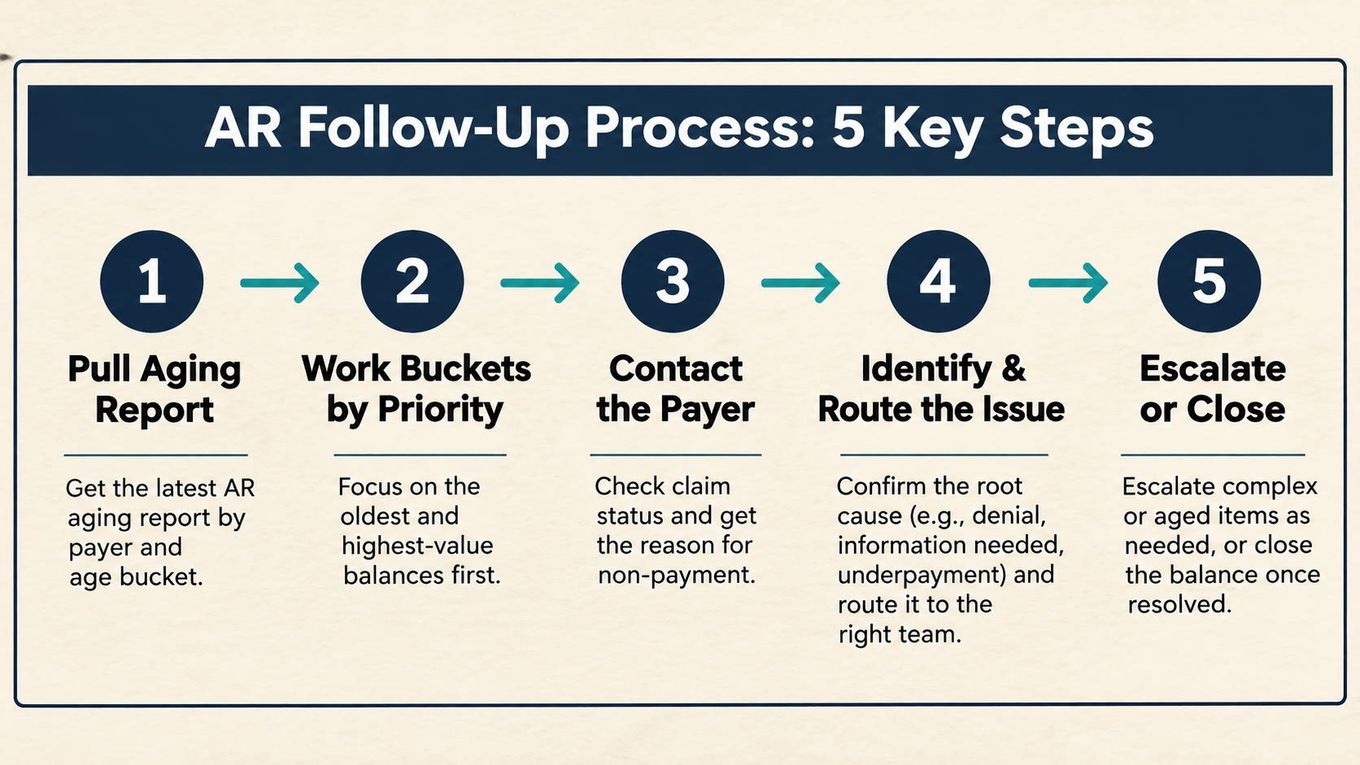
1. Pull the aging report and sort it correctly. Every AR follow-up session starts with the aging report: a view of outstanding claims sorted by how long they've been unpaid. Most billing platforms (Tebra, AdvancedMD, Athenahealth, and others) generate this automatically. The critical mistake: working oldest claims first, or newest claims first. Work by dollar value within each bucket, and flag anything approaching a timely filing deadline before anything else.
2. Work the aging buckets in priority order. Each bucket requires a different action:
| Aging Bucket | Action |
|---|---|
| 0-30 days | No action yet for most payers; verify claim was received by clearinghouse |
| 31-60 days | Check claim status via payer portal or clearinghouse; resubmit if rejected at clearinghouse |
| 61-90 days | Direct payer contact; confirm adjudication status; escalate if claim shows no activity |
| 91-120 days | Payer call or portal dispute; request supervisor escalation if needed; check timely filing window |
| 120+ days | Evaluate write-off vs. appeal; last-resort escalation; close account with correct adjustment code |
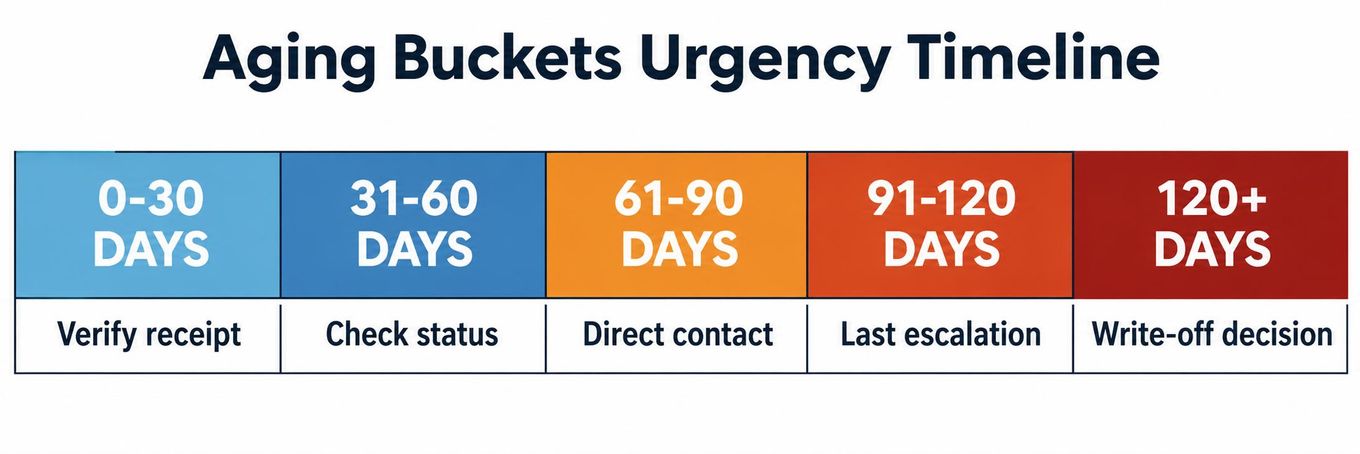
A $12 claim at 25 days is not an emergency. A $4,200 claim at 85 days with a 90-day appeal window absolutely is.
3. Contact the payer. Most payers now offer claim status checks via portal, which is faster than phone. Use portals for status lookups. Use phone for escalations, disputes, or any claim where portal status hasn't changed in 14+ days. When you call: have the claim number, NPI, date of service, and billed amount ready before you dial. Document everything, including the representative's name and reference number.
4. Identify and route the issue. An unpaid claim has one of a small number of explanations:
- Claim received and in process (expected turnaround not hit yet)
- Claim received but pending additional information
- Claim denied (needs denial management workflow)
- Claim lost or never received by payer (resubmit)
- Claim on hold for coordination of benefits or eligibility issue
- Claim processed and paid, but payment applied incorrectly in your system
Each routes differently. Getting this wrong wastes follow-up time on accounts that have already resolved.
5. Escalate or close. An account that hasn't moved after two follow-up attempts needs escalation, whether that's a supervisor call, a formal dispute via the payer portal, or a hand-off to your denial management team for a formal appeal. An account that genuinely can't be collected needs to be closed correctly with the right adjustment code, not left open inflating your AR indefinitely.
The Aging Report: Your Most Important Tool
The AR aging report is not a report you glance at once a week. It is the central operational document of insurance follow-up. Here's what a healthy aging distribution looks like vs. what a struggling one looks like:
| Metric | Healthy | Needs Attention |
|---|---|---|
| Days in AR | Under 40 days | 50+ days |
| AR >90 days (% of total) | Below 15-20% | 25%+ |
| Net collection rate | Above 95% | Below 92% |
| First-pass denial rate | Below 5% | Above 10% |
| Clean claim rate | Above 95% | Below 90% |
If your AR >90 days bucket is growing quarter over quarter, you have one of two problems: front-end errors generating denials (a credentialing or coding issue), or a follow-up workflow that isn't getting to accounts before they age past the appeals window.
When to Write Off vs. When to Appeal
The hardest call in AR follow-up is the write-off decision. Writing off too early loses collectible revenue. Holding accounts open too long inflates your AR, distorts your Days in AR metric, and burns follow-up hours on claims that will never pay.
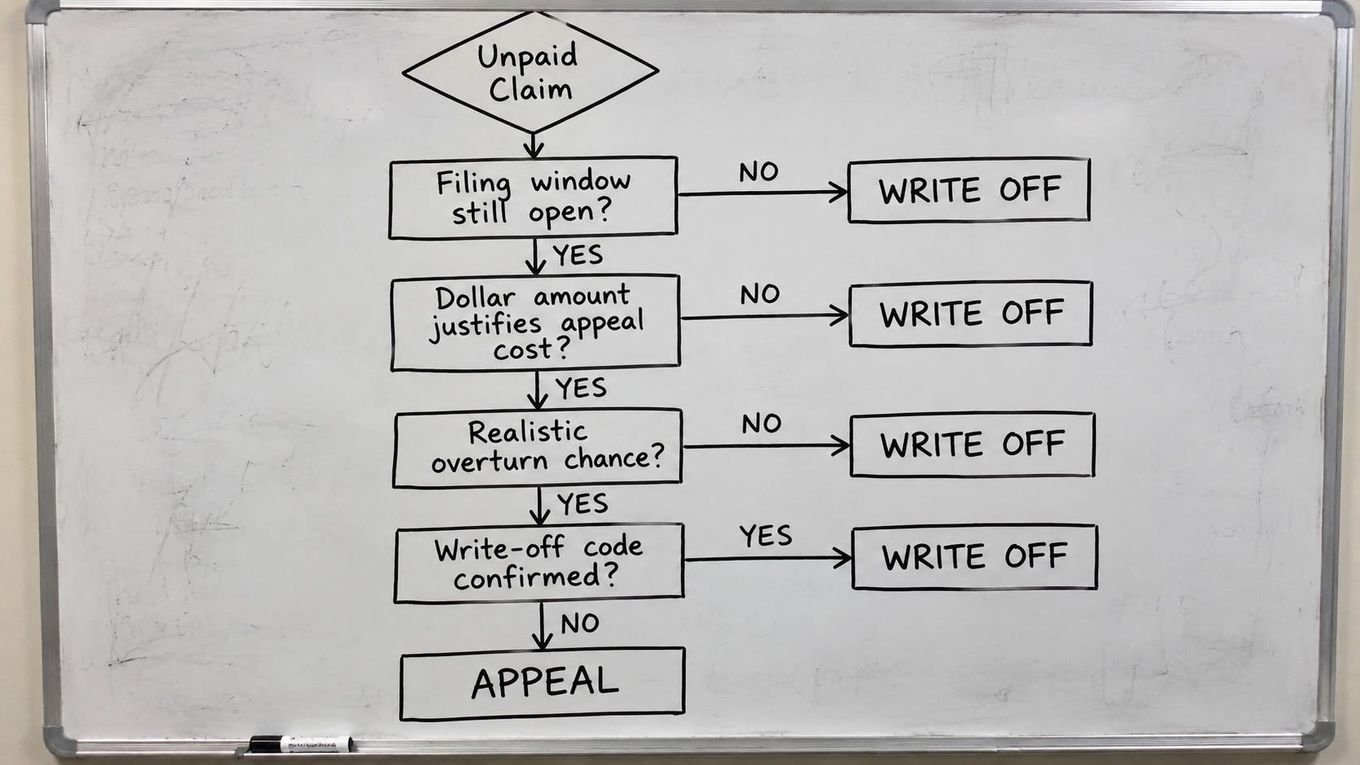
Run these four checks before closing any account:
1. Is the timely filing window still open? Check the window for both initial submission and appeal. If both are expired, write it off. No amount of follow-up recovers a claim that is past every deadline.
2. Does the dollar amount justify the work? A claim under $75-$100 that requires a formal appeal letter, provider documentation support, and two follow-up calls is likely a net loss once staff time is factored in. Most practices set a minimum appeal threshold and write off small balances with a small-balance adjustment code rather than routing them through the full appeal workflow. Set that threshold based on your actual staff cost per appeal, not an arbitrary number.
3. What is the realistic overturn probability? An administrative denial, wrong ID, missing modifier, coordination of benefits error, is highly reversible if corrected and resubmitted promptly. A medical necessity denial where the clinical documentation genuinely doesn't support the billed service level has lower odds, particularly on a first-level appeal without additional provider input. Know the category before allocating appeal time.
4. Is the write-off properly coded? A write-off is not a number erased from AR. Each closed account needs the correct adjustment code: contractual adjustment for amounts over the contracted rate, bad debt, timely filing miss, or small balance write-off. Miscoded write-offs distort your net collection rate, create audit exposure, and make it impossible to trend the actual source of your revenue leakage.
Write-off authority should also be clearly defined. Who can approve a write-off, and at what dollar threshold, should be a documented policy, not an informal decision made in the billing queue.
Payer-Specific Reality: How Follow-Up Differs by Payer
Not all payers behave the same, and your AR follow-up workflow needs to account for that.
Medicare: Generally more predictable turnaround times. Clean electronic claims process within 14 days; paper claims within 29-30 days. Unexpected delays usually mean a documentation request or medical necessity review. Use the Medicare Administrative Contractor (MAC) portal for status checks before calling. Appeals deadlines are strict: 120 days for Redetermination (Level 1), 180 days for Reconsideration (Level 2).
Medicaid: Varies enormously by state. Processing delays are common. Eligibility issues are the most frequent cause of unpaid Medicaid claims, most of which are preventable with real-time eligibility verification at the time of service. Know your state's Medicaid portal and its quirks.
Commercial (Aetna, Cigna/Evernorth, UnitedHealth/Optum): Each has its own portal, its own turnaround expectations, and its own process for disputes. Cigna/Evernorth is known for processing delays on behavioral health claims. Optum routes behavioral health through separate carve-out entities with distinct credentialing and adjudication processes. Building payer-specific follow-up protocols for your top five payers by volume will save more time than any generalized workflow.
Behavioral health: Claims for mental health and substance use treatment have consistently higher denial and delay rates than most other specialties. Prior authorization requirements are more complex, benefit carve-outs mean the wrong payer entity gets billed, and documentation requirements for CPT codes like 90837, 90834, and 90847 get contested frequently. Behavioral health AR follow-up needs payer-specific logic, not generic billing rules.
For a detailed look at why mental health claims get stuck or denied: Why Mental Health Claims Get Denied
Timely Filing: The Deadline That Makes Everything Else Irrelevant
Every payer has a timely filing window: the outer limit for submitting an initial claim and, separately, for filing an appeal. Miss it and no amount of AR follow-up recovers that revenue.
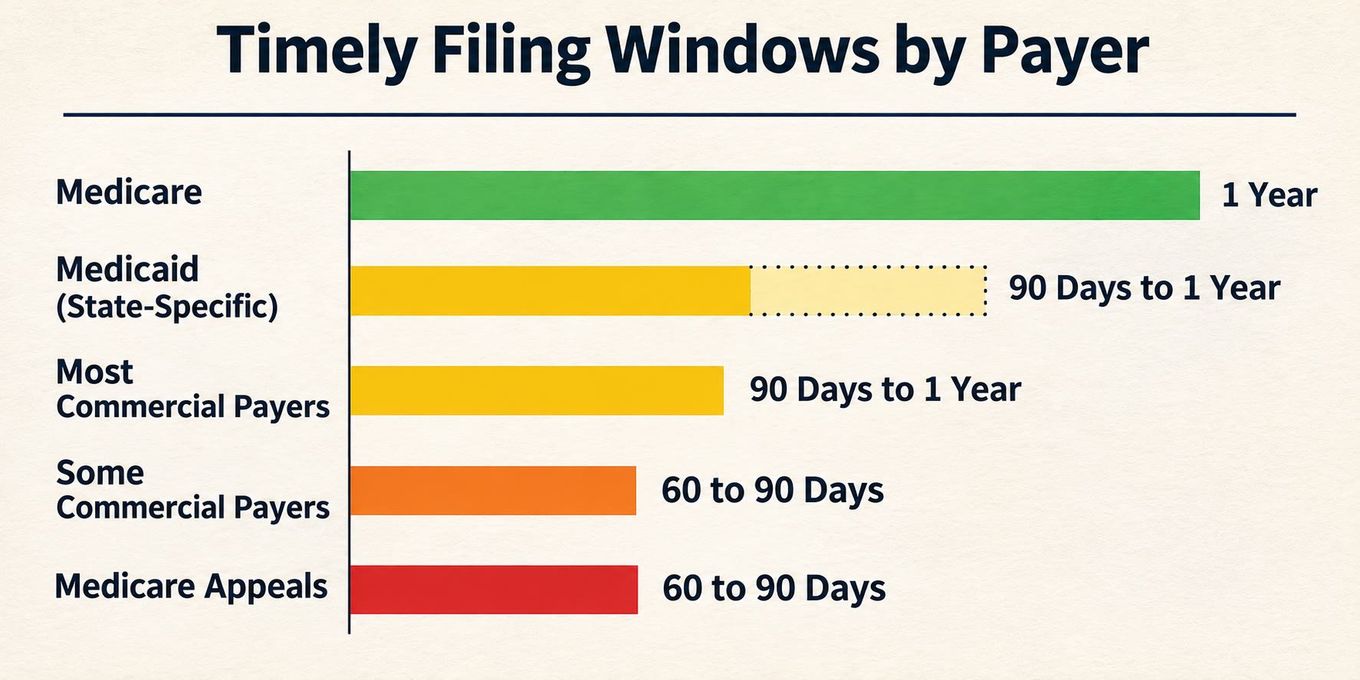
Standard windows by payer type (verify in your payer contracts):
| Payer Type | Typical Timely Filing Window |
|---|---|
| Medicare | 1 year from date of service |
| Medicaid | 90 days to 1 year (state-specific) |
| Most commercial payers | 90 days to 1 year from date of service |
| Some commercial payers | As short as 60 days from date of service |
| Medicare appeals (Redetermination) | 120 days from initial determination |
| Medicare appeals (Reconsideration) | 180 days from initial determination |
The practical implication: flag every claim in your AR report that is approaching its timely filing deadline and prioritize those above everything else, regardless of dollar value. A $500 claim at 85 days with a 90-day window outranks a $5,000 claim at 45 days with a 365-day window.
Why Claims Enter AR in the First Place
Most AR follow-up is spent chasing problems that could have been prevented upstream. If the same CARC codes keep appearing from the same payer on the same procedure types, the fix is a process change, not more follow-up hours. Here are the most common front-end failures and where they show up in AR:
| Root Cause | How It Shows in AR | Prevention |
|---|---|---|
| Eligibility not verified | Denial for inactive coverage or wrong plan; claim sits until corrected and resubmitted | Real-time eligibility check at every visit, not just at registration |
| Missing or lapsed prior authorization | Denial for no auth; often hits the 61-90 day bucket before billing catches it | Authorization tracking log by procedure and payer; alert for expiring auths |
| Coding error at submission | Clearinghouse rejection or coding-conflict denial; frequently not caught until AR review | Pre-submission claim scrubbing; coder review for high-dollar claims |
| Credentialing gap | Denial because provider not yet enrolled with the payer | Credentialing pipeline tracking; flag new providers until enrollment confirmed |
| Coordination of benefits dispute | Claim pended while payer determines primary vs. secondary | Verify COB status at eligibility check; update records when patient coverage changes |
| Unanswered documentation request | Additional Development Request (ADR) sent by payer; claim pends; billing team misses it | Regular ERA review; portal inbox monitoring for payer correspondence |
| Medical necessity documentation gap | Documentation doesn't support the billed service level; clinical denial after adjudication | Provider education on payer-specific documentation requirements; template updates |
The practical value of this list: when you pull your denial trending report, map the top five CARC codes back to this table. Each one points to a specific upstream fix. Addressing the root cause prevents the next 50 versions of the same claim from ever entering AR.
Warning Signs Your AR Follow-Up Is Falling Behind
AR follow-up problems rarely announce themselves. They show up slowly in metrics that look acceptable until they don't. These are the specific signals that the workflow is breaking down, and what each one usually means:
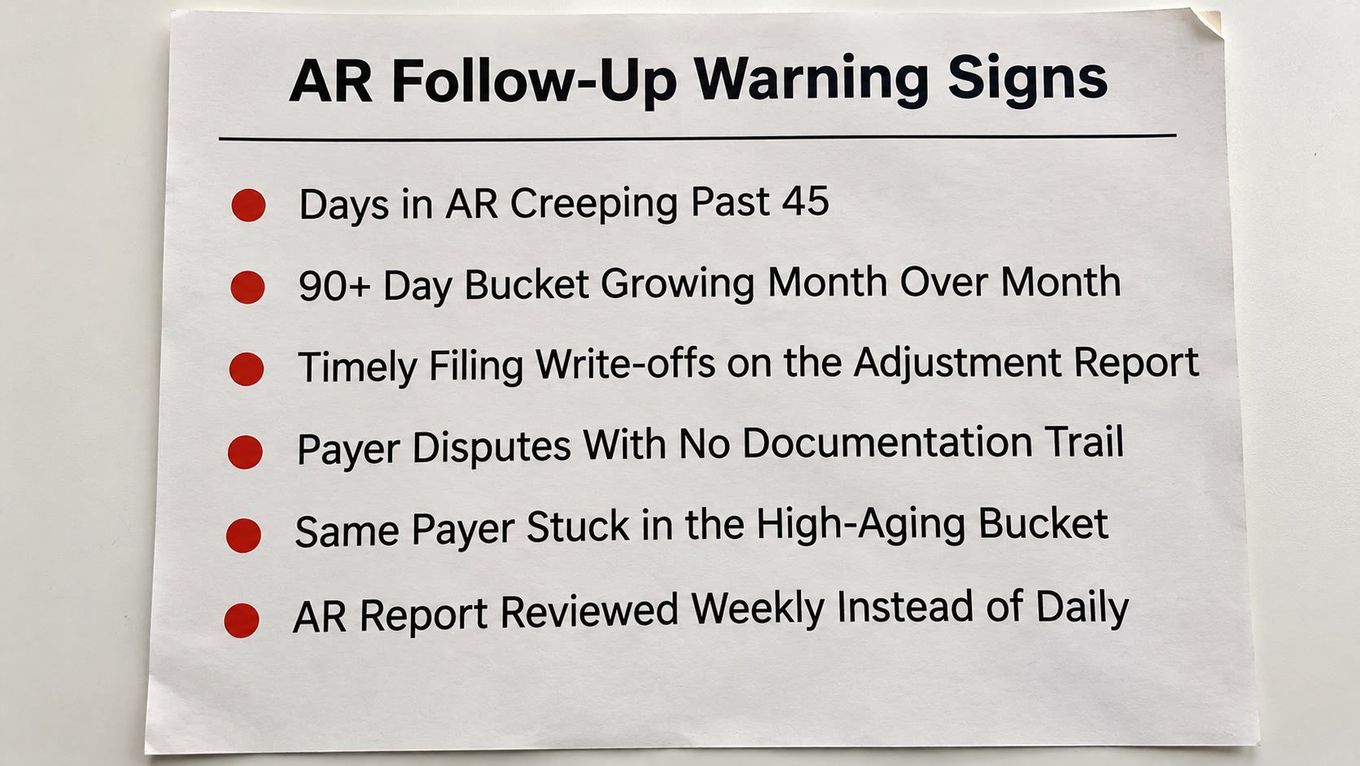
Days in AR creeping past 45. The most common symptom. Usually caused by either a volume problem (claims outpacing follow-up capacity) or a prioritization problem (staff working new claims first instead of aging buckets by dollar value and deadline).
The 90+ day bucket growing every month. If this percentage keeps climbing, claims are reaching the appeals window without anyone touching them. This is a workflow sequencing issue, not just a staffing one. Check whether the aging report is being worked daily or only when someone has time.
Timely filing write-offs appearing on the adjustment report. Each one is a preventable revenue loss. Even a handful per month adds up fast. This signals that the follow-up workflow isn't flagging deadline-critical claims before they expire. The fix is a daily filter on claims approaching 60-80% of the payer's timely filing window.
Payer disputes with no documentation trail. If a claim gets escalated and the follow-up notes say "called payer" with no rep name, reference number, or outcome, there's no case to build on. When a payer disputes its own adjudication or a claim needs a second-level appeal, undocumented follow-up calls are essentially worthless. Every payer contact needs a date, rep name, reference number, and next action.
The same payer appearing repeatedly in the high-aging bucket. One or two difficult payers showing up consistently in the 91-120 day bucket often means the team doesn't have payer-specific follow-up protocols. Each major commercial payer has its own portal, its own escalation path, and its own unwritten rules about what actually moves a stuck claim. Generic follow-up steps don't work the same way on every payer.
AR report reviewed weekly instead of daily. At low claim volume this is manageable. At mid-to-high volume, a week of aging on a claim approaching a deadline is the difference between a collected claim and a write-off. If AR follow-up is treated as a weekly task, the workflow is structurally set up to miss deadlines.
If more than two or three of these apply, the follow-up workflow needs either a structural fix or additional capacity, not incremental adjustments.
Why Trust This Article
This content is written by the team at Clarity Health RCM, which traces its roots to Quality Medical Billing, founded in 1988. Under President and CEO Estelle Sandoval, we bring 40+ years of combined revenue-cycle experience across behavioral health, inpatient and outpatient physician billing, and hospital settings.
The benchmarks cited here, including MGMA-sourced KPI targets for Days in AR, net collection rate, and denial rates, reflect both published industry data and what we see working real AR aging reports for clients across our specialty base.
How Clarity Approaches AR Follow-Up
For practices dealing with aging AR, growing backlogs, or a 90+ day bucket that keeps expanding, we provide structured AR follow-up and denial management as part of our revenue cycle management services.
We work with behavioral health practices, physician groups, and hospital systems where payer-specific follow-up discipline has a direct impact on cash flow. If your Days in AR is above 50 or you're writing off claims you should be collecting, that's worth a conversation.
For behavioral health practices specifically, see how we approach the credentialing and billing complexity that feeds AR problems in this specialty: Behavioral Health Billing
Frequently Asked Questions
What is AR follow-up in medical billing? AR follow-up in medical billing is the process of tracking all submitted claims that have not yet been paid, contacting payers and patients to resolve outstanding balances, and closing each account either through payment, an approved appeal, or a correctly coded write-off. It is a core revenue cycle function distinct from denial management: AR follow-up handles all unpaid claims regardless of reason, while denial management specifically addresses claims that have been formally refused by a payer with a reason code.
How often should AR follow-up be done? AR follow-up should be a daily or near-daily activity for high-volume practices, not a weekly or monthly report review. Claims approaching timely filing deadlines or in the 61-120 day buckets need active attention; newer claims in the 0-30 day bucket generally don't require outreach yet. Most billing teams set a structured cadence: work the aging report by bucket and dollar value each morning before new claim submissions go out.
What is a good Days in AR benchmark for medical billing? MGMA benchmarks a target of under 40 days in AR for most physician groups, with high-performing practices keeping that number below 30. A Days in AR above 50 typically signals either a front-end billing problem (eligibility errors, missing authorizations, coding issues generating denials) or a follow-up workflow that isn't reaching accounts in time.
What percentage of AR should be over 90 days? Best-practice benchmarks put AR >90 days at below 15-20% of total outstanding AR. When this bucket grows above 25%, it usually indicates either a timely filing miss problem, an appeals workflow that isn't working fast enough, or an aging backlog that has accumulated over time and requires a targeted remediation effort.
What causes claims to age in AR without payment? The most common causes are: the claim was submitted with errors and rejected at the clearinghouse without the billing team noticing; the payer is processing slowly or requires additional documentation; the claim was denied and routed incorrectly instead of to a denial management workflow; coordination of benefits issues are holding adjudication; or the claim was paid but posted incorrectly in the billing system. Each cause requires a different resolution, which is why checking claim status before taking action is the first step in every follow-up call.
How is AR follow-up different from denial management? AR follow-up is the broader function: it pursues all unpaid claims, whether pending, delayed, or denied. Denial management is a specific subset focused on claims a payer has formally refused with a reason code, involving root cause analysis, appeal letter preparation, and resubmission. In practice, the AR follow-up team identifies denials through the aging report and hands them to the denial management team for formal appeal. They require different skills, different staff, and different performance metrics.
When should a practice outsource AR follow-up? Outsourcing makes economic sense when the AR >90 days bucket is growing, timely filing misses are occurring, staff turnover is creating follow-up gaps, or payer complexity exceeds what in-house staff can manage. Practices with behavioral health carve-outs, Medicaid contracts with state-specific rules, or multiple commercial payers often find that a specialized billing firm's institutional payer knowledge recovers more from AR than the cost of the engagement.