
Revenue cycle management systems are no longer back-office plumbing. The market is already too large for that framing. One industry estimate puts the global market at USD 385.4 billion in 2025, with a path to USD 955.5 billion by 2033 at a 12.0% CAGR from 2026 to 2033, while another places it at USD 58.27 billion in 2024, rising to USD 117.50 billion by 2030 at a 12.4% CAGR. Those numbers tell you the same thing from different angles, healthcare organizations are spending heavily on the machinery that moves money from payer to provider. Grand View Research
If you're a CFO, CEO, or physician-owner, the key question isn't whether to “get RCM.” It's whether your current stack improves cash flow, or just gives you more screens to click through. The right system reduces friction at the point of registration, pushes cleaner claims out the door, posts money correctly, and exposes denials before they become write-offs.
Table of Contents
- What Revenue Cycle Management Systems Do
- How the Revenue Cycle Maps to Three Operational Layers
- Five Core Capabilities Every RCM System Must Cover
- The KPIs That Prove an RCM System Is Working
- Choosing Between a Software Platform and a Managed RCM Partner
- Implementing RCM Without Over-Automating Exceptions
- Five Pitfalls That Quietly Sabotage RCM Investments
- Your Next Step and a Complimentary Revenue Cycle Review
What Revenue Cycle Management Systems Do
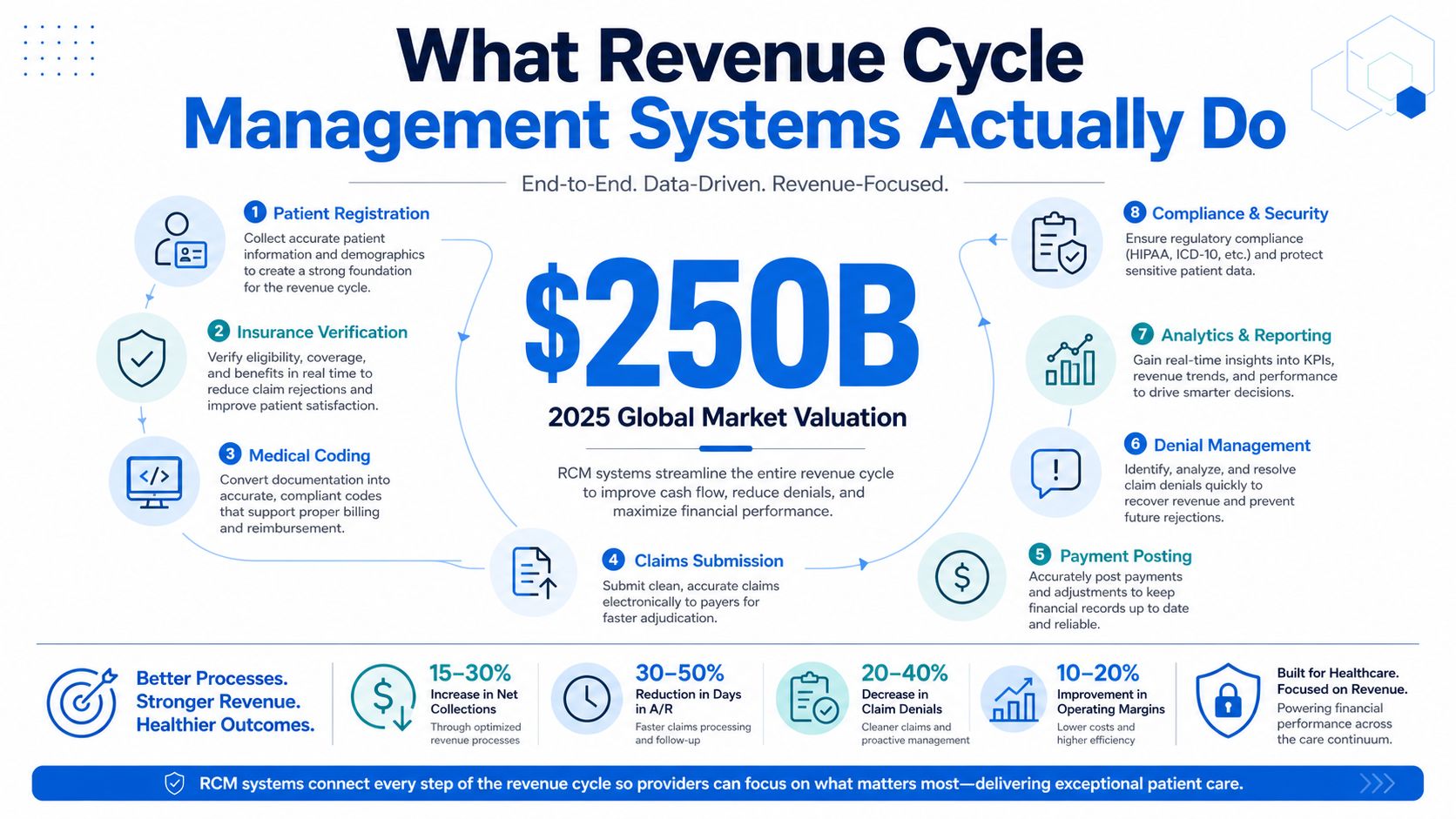
A revenue cycle management system is the set of software and services that turns patient care into paid claims. That sounds obvious, but plenty of buyers still confuse it with an EHR, a practice-management tool, or a glorified billing ledger. It's none of those things. It's the operational layer that has to connect scheduling, eligibility, coding, claims, remittance, denials, and patient collections so revenue doesn't stall between care and reimbursement.
The four jobs that matter
The system has four basic jobs. First, it verifies eligibility and benefits before the patient shows up, because bad front-end data creates downstream waste. Second, it submits clean claims, meaning claims that get through payer rules without avoidable rework. Third, it posts payments accurately so finance teams know what was paid, adjusted, or left open. Fourth, it manages denials and appeals so the organization can recover revenue instead of letting it leak away.
Practical rule: if your billing team still rekeys the same patient or payer data in multiple places, you do not have a real RCM system yet, you have disconnected tools.
The market scale matters because it reflects a broad operational shift toward automated and outsourced revenue operations across hospitals, physician groups, and payers. The buyer's real decision is what should be automated first, what proves the system is working, and when buying software is the wrong move. A system that only records transactions is passive. A system that improves cash conversion is doing the job you hired it for.
What to expect from a real stack
A working stack does more than collect data. It reduces touches, shortens follow-up, and makes billing behavior visible enough for leaders to manage. That means your demo should show how the tool handles payer edits, exception handling, and handoffs, not just how pretty the dashboard looks.
The right question is simple. Does this reduce work, or does it move work around? If it does not change that answer, it is not worth much.
How the Revenue Cycle Maps to Three Operational Layers
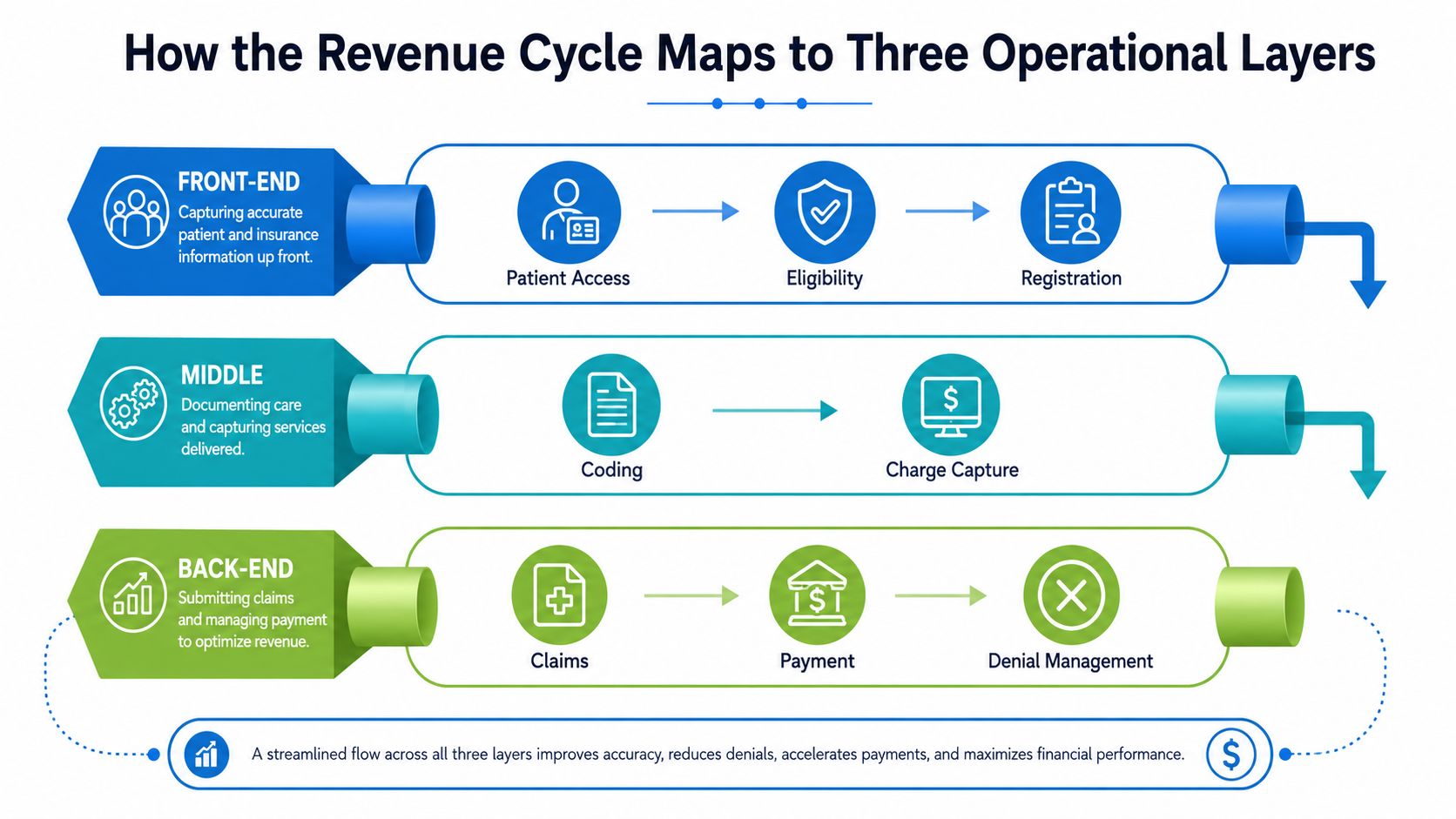
Think of the revenue cycle like a relay race. If registration drops the baton, the denial shows up later, usually when the patient is long gone and the fix is expensive. That's why serious buyers stop looking at isolated features and start looking at the pipeline.
Front-end patient access
The front-end handles eligibility verification, registration accuracy, and prior authorization. These are not administrative niceties, they are control points. The AMA's guidance on revenue cycle structure treats pre-service checks as technically high-impact because mistakes here spread downstream into rework and avoidable denials. AMA Ed Hub
If your intake team is rushing, your system has to compensate. That means the tool should make insurance checks visible, flag mismatches early, and prevent weak data from becoming a claim problem later. A clean front end saves more money than a fancy denial dashboard.
Mid-cycle coding and charge capture
The middle layer is where clinical activity becomes billable work. Coding and charge capture have to be tight, because every omitted or misclassified service changes what you can legitimately collect. This is also where integration with the EHR matters most. If clinicians document in one system and billing cleans it up manually in another, you'll keep paying for that gap with labor and delays. Clarity's overview of charge capture is a useful example of how providers think about that handoff in practice, especially when they're evaluating workflow fit, not just software features. Charge capture workflow overview
Back-end claims and collections
The back end covers claims submission, remittance posting, accounts receivable follow-up, and denials. Leaders often overestimate the value of volume and underestimate the value of routing. A strong system doesn't just queue work, it pushes the right claim to the right person at the right time.
A payer-facing workflow is only as good as the first bad record it accepts.
If you want to know where your money is leaking, map each delay to one of those three layers. Most organizations don't have a single RCM problem. They have a front-end problem that shows up as a claims problem and gets blamed on collections.
Five Core Capabilities Every RCM System Must Cover
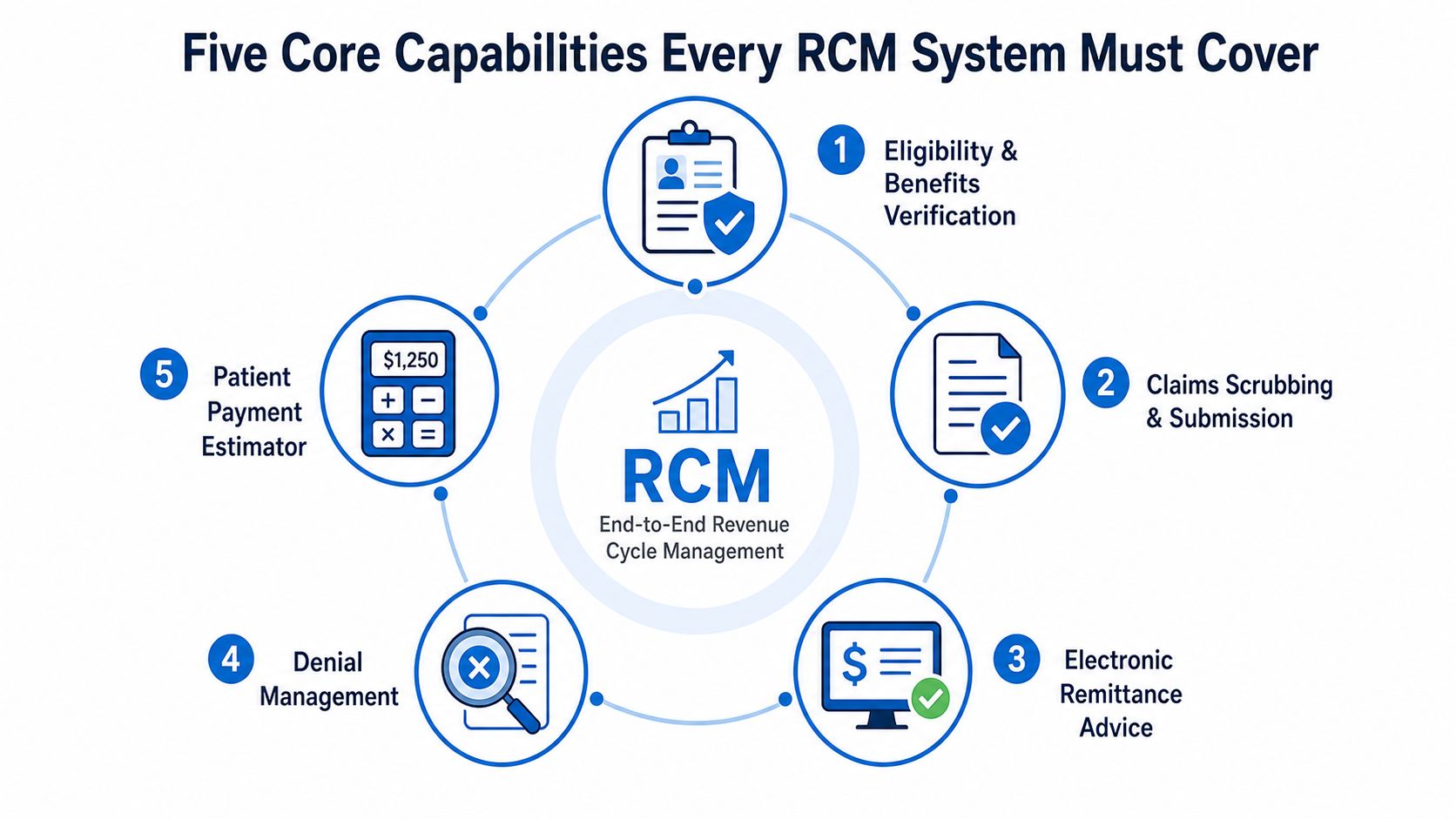
A vendor can name twenty modules. Ignore that. If the system can't do these five things well, you'll still be paying people to patch the gaps.
Eligibility, claims, and payment posting
Start with eligibility and benefits verification. In a demo, don't ask whether it exists. Ask whether the check runs in real time, whether mismatches are flagged before registration closes, and whether staff can resolve issues without jumping into another app.
Then look at claims scrubbing and submission. The key test is whether the system catches missing fields, payer-specific edits, and documentation gaps before the claim goes out. A nice interface means nothing if the scrubber is weak.
For electronic payment posting, insist on line-item accuracy and clean reconciliation. If the system posts payments in bulk without preserving claim-level detail, finance will end up untangling the mess later.
Denials, analytics, and patient estimates
Denial management should not live in a generic queue. It should route by payer, denial reason, and work priority. If appeals sit in a flat inbox, your team is managing volume instead of fixing root causes.
Analytics matter only if they expose the pattern behind the problem. You want denial trends by root cause, payer behavior, workflow stage, and staff handoff. Totals alone are vanity metrics. Clarity's analytics page is a good reminder that reporting should support operational decisions, not just executive screenshots. Healthcare revenue cycle analytics
Finally, ask about patient payment estimation. If the system can't support transparent estimates and friction-reducing patient payment workflows, it's behind the consumer side of revenue cycle management. Patient collections are no longer separate from RCM performance, they're part of it.
| Capability | What to test in the demo | What weak performance usually looks like |
|---|---|---|
| Eligibility and benefits verification | Real-time checks, exception flags, workflow speed | Front-desk rework and downstream denials |
| Claims scrubbing and submission | Payer edits, missing data detection, claim routing | Avoidable rejections and delayed filing |
| Electronic payment posting | Line-level reconciliation, adjustment logic | Manual balancing and posting errors |
| Denial management | Payer-based routing, worklists, appeal tracking | Generic queues and missed recovery |
| Reporting and analytics | Root-cause views, trend analysis, drill-downs | Pretty dashboards with no actionability |
The KPIs That Prove an RCM System Is Working
Features don't pay the bills. Outcomes do. If you can't tie the system to cash flow, you're buying software for the sake of software.
The three benchmarks that matter first
Industry guidance commonly targets a clean claim rate of about 80%, an accounts receivable window of 30 to 40 days, ideally under 45 days, and a claim denial rate below 10%. Those are the numbers that tell you whether the system is reducing friction between care and reimbursement. NCDS key RCM metrics
| KPI | Target Benchmark | What a Miss Signals |
|---|---|---|
| Clean claim rate | About 80% | Front-end checks, coding, or scrubber issues |
| Days in accounts receivable | 30 to 40 days, ideally under 45 | Cash is getting stuck in follow-up |
| Claim denial rate | Below 10% | Eligibility, documentation, or credentialing weaknesses |
A single quarter doesn't prove much. One good month can come from backlog cleanup, and one bad month can come from a payer rule change. What matters is the direction of travel and whether the system is improving the trend without creating more manual cleanup elsewhere.
Operational rule: review RCM KPIs as movement over time, not as a victory lap for one reporting period.
What to add to the dashboard
You also need metrics that tell you how hard the team is working for the money. Net collection rate, first-pass resolution, and cost to collect are useful because they expose whether efficiency is improving or just being obscured by volume. Don't let the monthly operating review become a theater of activity counts.
If your team can't connect dashboard numbers to action, the dashboard is decorative. A good RCM system forces better decisions, then shows whether those decisions paid off.
Choosing Between a Software Platform and a Managed RCM Partner
This is the decision most vendors dodge. Buying software and outsourcing revenue cycle operations are not the same choice, and pretending they are leads to bad purchases.
When software makes sense
A software platform makes sense when you already have billing depth, disciplined managers, and enough internal muscle to own follow-up. You get more control, more customization, and more ability to tune workflows to your own rules. You also inherit the burden of staffing, training, and ongoing oversight.
That trade-off is fine for mature teams. It is a bad fit for organizations that keep losing people to turnover or can't sustain cleanup work across claims, denials, and patient balances. The software doesn't solve those problems by itself.
When a managed partner wins
A managed RCM partner wins when the bottleneck is execution, not just tooling. If your denial work is piling up, your front desk is undertrained, or leadership can't keep enough experienced billers on payroll, outsourcing is usually the cleaner answer. You offload staffing risk and buy operating discipline, not just features.
Clarity's service model fits that category because it covers fee schedule and practice management setup, billing operations support, insurance benefit verification, and claim status with payment posting, which gives CFOs a practical option when they want the work handled rather than merely tracked. Clarity RCM companies overview
How to score the choice
Use four decision criteria. Current staffing depth tells you whether you can realistically run the system. Denial-rate baseline shows whether the house is already on fire. Growth trajectory reveals whether the current model can scale. Capital appetite decides whether you want to buy software and build around it, or pay a partner to take responsibility.
| Decision factor | Platform bias | Managed partner bias |
|---|---|---|
| Staffing depth | Strong internal billing team | Thin or unstable billing team |
| Denial baseline | Controlled denial environment | High or rising denials |
| Growth trajectory | Stable operations | Rapid growth or operational strain |
| Capital appetite | Willing to build and manage | Prefers predictable operating expense |
My opinion is blunt. If you have fewer than three full-time billers or your denial rate is above 12%, stop romanticizing software ownership and look hard at a partner model. That doesn't mean platform tools are wrong. It means your current economics probably can't support the hidden labor a platform still needs.
Implementing RCM Without Over-Automating Exceptions
Automation is useful only when it removes repetitive work and leaves judgment where judgment still matters. Too many teams try to automate the entire revenue cycle at once, then wonder why exceptions get mishandled and staff get frustrated.
Start with low-complexity work
The safest first targets are the rule-based, high-volume tasks, eligibility checks, claim status inquiries, simple reconciliations, and routine routing. That matches the practical guidance from McKinsey-style thinking on revenue-cycle transformation, which stresses starting with repetitive work and balancing people, process, and technology instead of forcing a tool into every corner. McKinsey revenue excellence view
Keep humans on exceptions, appeals, and payer relationship work. Those areas are messy, and they stay messy even when the rest of the workflow is digitized. If you automate the exception path too aggressively, you'll hide complexity instead of solving it.
Govern automation with KPIs
No automation program should launch without a clear metric set. If you can't see whether automation improves clean claim rates, days in A/R, or denial patterns, then you're guessing. Guessing is expensive.
Bottom line: automate the repeatable steps first, then let performance data decide where the next layer belongs.
That approach gives you control. It also keeps billing staff from being sidelined in places where experience still matters. The best revenue cycle teams use automation to clear the noise, not to replace judgment.
Five Pitfalls That Quietly Sabotage RCM Investments
A mid-size practice can buy the right tool and still underperform if leadership makes avoidable mistakes. I've seen that movie. It usually starts with optimism and ends with a billing team doing extra work to compensate for a bad design choice.
The usual failure pattern
The first mistake is treating RCM as an IT project instead of an operations project. That leads to software decisions without workflow ownership. The fix is simple, put finance, billing, front desk, and clinical leadership at the same table.
Second, teams skip eligibility verification because it feels slow at intake. Then the denials show up later, and the team pays for the shortcut repeatedly. Third, organizations under-invest in credentialing, which leaves claims vulnerable before they even hit the payer.
The integration and change traps
Fourth, buyers choose a platform without testing integration with the EHR. That creates double entry and errors, which wipes out a lot of the promised efficiency. Fifth, they ignore change management for clinical staff, so documentation habits never line up with billing requirements.
A good implementation leader attacks those issues in order. Fix eligibility first. Lock down credentialing. Test the EHR connection before go-live. Train clinicians on the behaviors that affect billing, not just the buttons on the screen.
The practices that struggle most are usually the ones that assume software can compensate for weak process discipline. It can't. Software amplifies what you already do, which is exactly why a bad workflow becomes expensive so quickly.
Your Next Step and a Complimentary Revenue Cycle Review
The strategic decision remains the same: keep billing in-house with software, outsource end-to-end, or run a hybrid model. If you're not sure which one fits, start with a diagnostic, not a purchase order. That's the smarter move for a CFO because it shows you where the money is leaking before you commit to a new operating model.
A useful review should cover the fee schedule, denial root causes, eligibility and verification gaps, payment-posting accuracy, and whether current workflows are creating avoidable rework. It should also tell you whether your team has enough internal capacity to run the model you're considering. That's the point where the conversation stops being theoretical and starts being financial.
For many organizations, the fastest path to better cash flow is not another software license. It's a clearer view of what's breaking, what should be automated, and what should be handed to a partner that already runs those workflows every day. If your leaders want a practical starting point, the first conversation should be about current state, not future features.
A CTA for Clarity.
No responses yet