

Your front desk is probably still doing work your billing team ends up paying for twice.
A patient shows up with incomplete forms, handwriting nobody can read, an insurance card photo taken at the desk, and a consent packet that gets scanned into the chart as a document nobody can search. Then your staff re-enters demographics, calls the payer, fixes mistakes, resubmits claims, and chases balances after the visit. Leaders often call this a patient access problem. It's really a revenue cycle problem that starts before the clinical encounter.
That's why digital patient intake software deserves executive attention. It's not a cosmetic upgrade to replace clipboards. It's one of the earliest control points in the revenue cycle, where bad data, missing eligibility checks, and weak patient financial engagement either get stopped or get passed downstream into denials, rework, and slower cash.
Table of Contents
- From Clipboard to Cloud What Is Digital Patient Intake
- How Digital Intake Directly Impacts Revenue Cycle Health
- Essential Software Features That Drive Financial ROI
- Navigating Critical Integration and Compliance Requirements
- An Executive's Roadmap for Successful Implementation
- How to Choose the Right Digital Intake Partner
From Clipboard to Cloud What Is Digital Patient Intake
Paper intake creates hidden labor at every step. Patients fill out forms in the waiting room. Front-desk staff decipher handwriting, scan cards, chase signatures, and type the same information into the EHR or practice management system. Billing then inherits whatever was missed.
Digital patient intake software replaces that manual chain with a guided pre-visit workflow. Patients complete demographics, insurance details, medical history, consent forms, and other questionnaires on their phone, tablet, or computer. Staff review structured information before arrival instead of rebuilding it after check-in.
More than a digital form
The closest analogy is airline check-in. You're not just replacing a paper boarding pass with a screen. You're moving identity confirmation, seat selection, document review, and status updates earlier in the process so the airport counter doesn't become the bottleneck.
Healthcare intake works the same way when it's done correctly. The software should:
- Collect information before arrival so registration doesn't begin when the patient walks in.
- Route forms intelligently so each patient sees the right packet instead of a one-size-fits-all stack.
- Capture consents electronically so signatures don't delay rooming or billing.
- Push data into operational systems so staff don't re-key the same information.
That last point matters most. If the platform just generates a completed PDF, you've digitized paper without fixing the workflow.
Digital intake should move work upstream, not just change the format of the paperwork.
Why executives should care now
This isn't a niche category anymore. The patient intake software market was valued at USD 1.71 billion in 2024 and is projected to reach USD 6.45 billion by 2034, with a 14.2% CAGR. That tells you something important. Providers aren't experimenting at the margins. They're standardizing around digital intake as part of modern operations.
For CFOs and CEOs, the takeaway is simple. Digital intake has become part of the revenue infrastructure. It affects whether registration data is complete, whether eligibility work happens early, whether staff spend time on clerical cleanup, and whether the billing office starts with usable information.
A clipboard slows the waiting room. A bad intake process slows cash.
How Digital Intake Directly Impacts Revenue Cycle Health
Finance leaders should stop viewing intake as front-office convenience. Intake is where claim quality begins.
Revenue starts before the visit
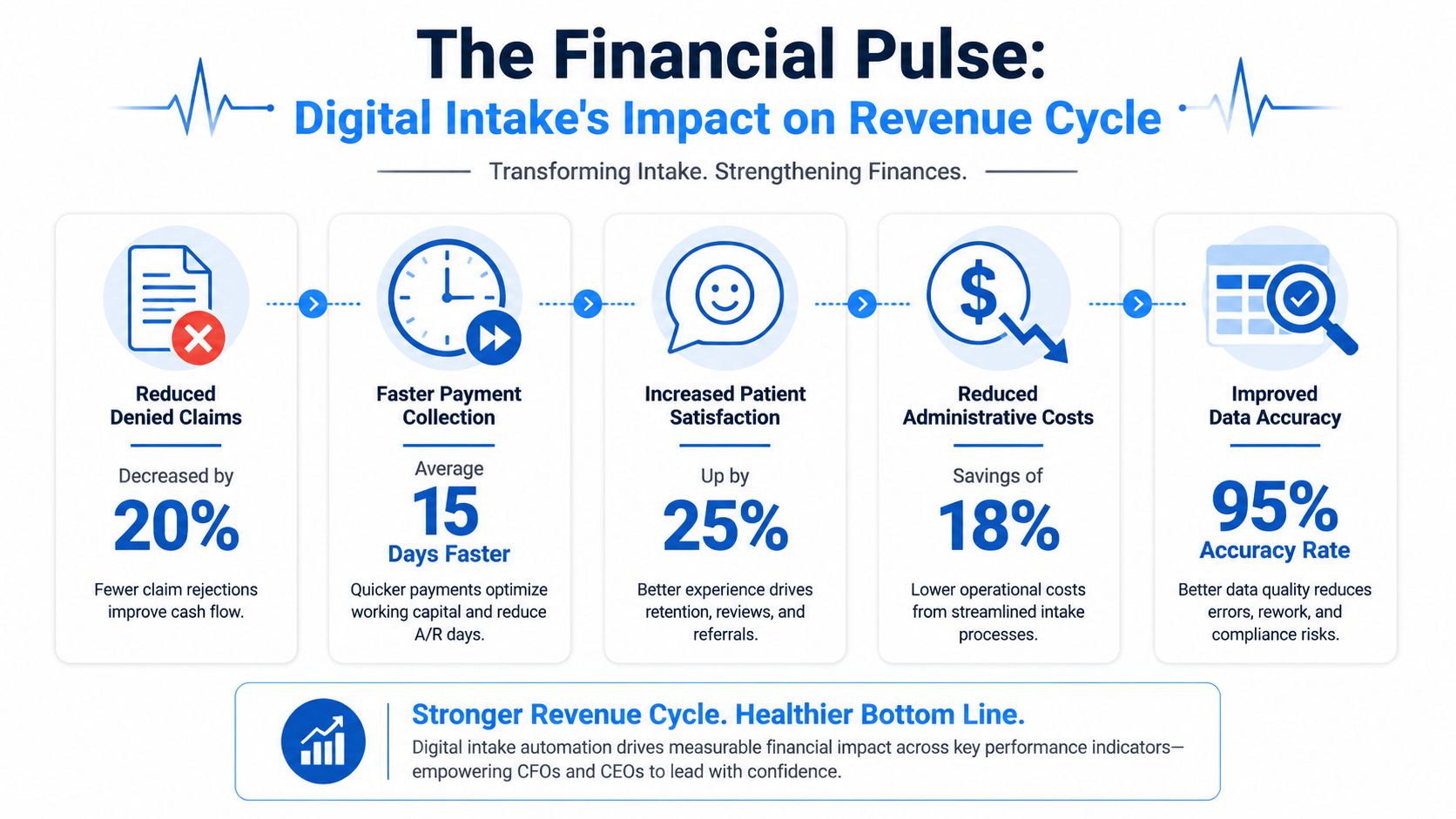
When patients complete intake digitally, the organization gets cleaner information earlier. That changes the economics of registration and billing. According to this overview of digital patient intake performance, digital intake reduces new-patient check-in times by approximately 72%, lowers data entry errors to 0.67%, and reduces patient no-show rates from 18% to 5%.
Those are operational metrics on the surface. In practice, they are revenue cycle metrics.
Shorter check-in means staff spend less time on paperwork and more time resolving exceptions that affect reimbursement. Lower data entry errors mean fewer demographic mistakes flowing into claims, fewer eligibility mismatches, and less avoidable rework. Lower no-show rates protect schedule utilization and preserve billable encounters that would otherwise disappear.
Here's the bigger point. Most denials don't feel dramatic when they start. They begin with a wrong subscriber ID, an incomplete registration, or insurance details collected too late to fix before the visit. Digital intake attacks those weak points at the front end.
The no-show problem is a revenue problem
Many organizations still treat reminders and pre-visit engagement as patient experience extras. That's a mistake. If the patient doesn't arrive, there's no claim, no copay collection, no professional fee, and no downstream ancillary revenue tied to that encounter.
Digital intake improves commitment before the appointment because the patient has already engaged with the visit. They've completed forms, reviewed information, and entered insurance details. Operationally, that creates a stronger pre-service workflow. Financially, it reduces holes in the schedule.
For leaders focused on cash realization, this also connects to collection performance. Better intake supports earlier financial communication and cleaner account setup, which helps protect your net collection rate performance long before the claim ages into a collections problem.
A useful reality check for executives is this: if your business office keeps fixing registration errors after claims are created, your revenue cycle starts too late.
Before looking at any platform demo, watch this short overview of what a digital intake workflow looks like in practice.
What finance leaders should watch
Don't ask whether staff like the forms. Ask whether intake improves the financial controls that matter.
| RCM area | What digital intake changes | Why leadership should care |
|---|---|---|
| Registration quality | Standardized fields and fewer manual entries | Fewer preventable downstream billing errors |
| Eligibility workflow | Insurance captured before the visit | Staff can resolve issues earlier |
| Schedule utilization | Stronger pre-visit engagement | Fewer empty appointment slots |
| Front-desk labor | Less re-entry and paper handling | Lower administrative drag |
| Early collections | Better setup for patient balance conversations | Less post-visit collection friction |
Practical rule: If a digital intake tool can't show you how it reduces rework in patient access and billing, it's not an RCM tool. It's just a nicer clipboard.
Essential Software Features That Drive Financial ROI
Most vendor scorecards are too shallow. They compare e-signatures, texting, and form customization as if each feature has equal value. It doesn't.
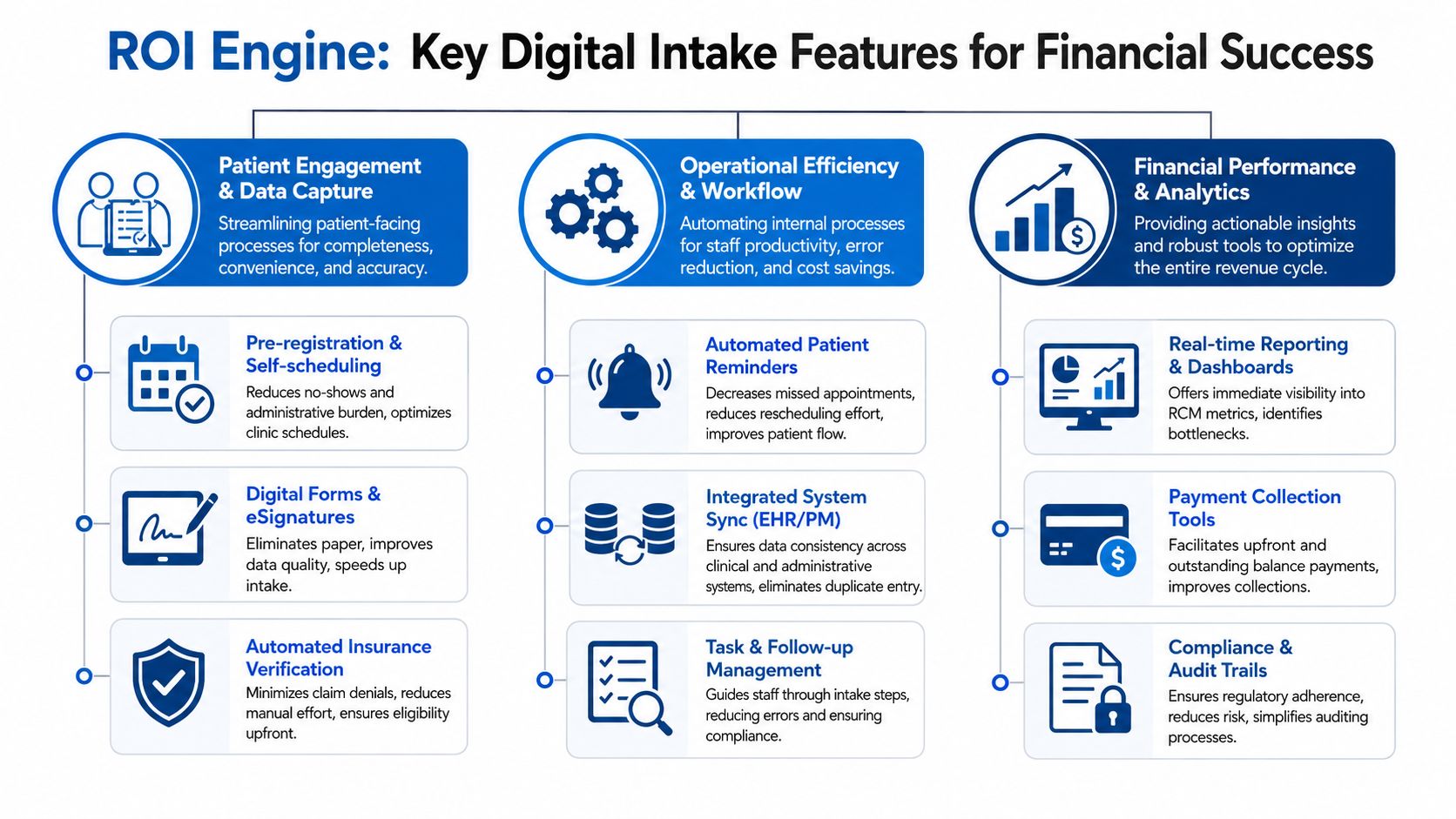
You should evaluate digital patient intake software by one standard. Does this feature improve data quality, accelerate collections, or lower labor cost? If the answer is no, it's secondary.
Data capture that protects claims
The first category is data integrity. On this point, strong platforms separate themselves from simple online forms.
Look for capabilities such as:
- Insurance and ID capture: Patients should be able to submit card and identification details before arrival, reducing manual handling at the desk.
- Required-field logic: The platform should prevent incomplete registration packets from moving forward.
- Structured demographic collection: Names, dates of birth, subscriber details, and contact fields should be standardized for downstream use.
- Clinical and consent routing: The right packet should go to the right patient based on specialty, visit type, or payer workflow.
These functions matter because they reduce preventable defects at the front end. That is the cheapest place to solve a revenue cycle problem. Cleaning up bad registration after claim submission costs more, takes longer, and usually drags in multiple teams.
If you're already evaluating broader healthcare RCM software platforms, intake should be judged as part of that ecosystem, not as a standalone patient engagement purchase.
Patient financial tools that move cash sooner
The second category is financial engagement. Too many organizations wait until after the visit to think about patient responsibility. That delay hurts collections.
The right digital intake platform should support:
- Pre-service balance communication: Patients should see what they need to review and acknowledge before the encounter.
- Integrated payment options: If the platform can collect at the right moment, staff spend less time on outbound balance recovery.
- Automated reminders: Follow-up prompts reduce missed steps that turn into delayed payment.
- Financial consent capture: Expectations should be documented early, not argued about after adjudication.
A patient who understands financial responsibility before the visit is easier to collect from than a patient who receives a surprise statement later. That's not a technology insight. It's a collections reality.
Workflow features that lower operating cost
The third category is operational efficiency. In this category, leaders often underweight the return because the savings show up as avoided labor, lower rework, and smoother throughput rather than a direct line item.
Focus on these capabilities:
- Bi-directional sync with core systems: Staff shouldn't type the same information into multiple places.
- Custom questionnaires by service line: Specialties need different intake logic. Generic packets create clutter and missing data.
- Task visibility for staff: Teams need to know who completed what, what's still missing, and what needs follow-up.
- Auditability: Every form, signature, and update should be traceable.
Here's the blunt version. If your current intake process still relies on scanning, printing, uploading, or manually reconciling data between systems, your operating model is carrying waste.
Buy features that remove labor from the workflow, not features that make labor look more modern.
Navigating Critical Integration and Compliance Requirements
A front desk can recover from a clunky form. Your revenue cycle cannot recover as easily from bad data flowing into the wrong places, or not flowing at all.
That is why integration and compliance deserve executive scrutiny during intake software selection. If the vendor gets either one wrong, your organization pays for it through registration errors, missed eligibility issues, avoidable denials, duplicate work, audit exposure, and slower cash collection.
Structured data decides whether intake helps RCM
Start with the integration question that matters most. Does the platform write data back into discrete fields in your EHR and practice management system, or does it just attach a document?
According to implementation guidance for digital patient intake, vendors should support FHIR R4 or at minimum HL7, and healthcare organizations also need to evaluate accessibility requirements such as WCAG 2.1 Level AA. That first point has direct financial consequences.
A PDF in the chart is storage. It is not workflow. Staff still have to open it, search for the right fields, and re-enter information by hand. That creates registration defects that show up later as claim edits, eligibility misses, prior authorization delays, and denials tied to subscriber or demographic errors.
Integrated eligibility checks matter for the same reason. The source above notes that automated checks through connected systems can return payer responses much faster than manual phone verification. Speed is only part of the value. The main gain is lead time. Your staff can correct coverage issues before the visit, collect the right amount up front, and keep bad claims from entering the billing queue.
Ask vendors to demonstrate three things live:
- Bi-directional exchange with your EHR and PM system, not one-way document export
- Field-level data mapping for demographics, insurance, guarantor details, consents, and clinical intake responses
- Real-time or near-real-time eligibility workflows tied to scheduling and registration activity
If a vendor cannot show where each intake field lands in your core systems, assume your staff will be doing manual cleanup later.
Compliance failures create revenue risk too
Compliance is not a legal side topic. It affects collections, operational cost, and payer exposure.
HIPAA is the baseline. You also need controls that protect data access, document who changed what, and support retention requirements. Those are table stakes for any platform touching patient registration and financial responsibility.
Focus your review on these areas:
- Role-based access controls so scheduling, clinical, and billing staff see only the data they need
- Audit trails that log access, edits, signatures, and submission history
- Record retention controls that match your regulatory and organizational policies
- Accessibility support for patients who use screen readers, keyboard navigation, or other assistive tools
- Language support for the populations your organization serves
Accessibility deserves direct executive attention. The same implementation guidance states that WCAG 2.1 Level AA compliance is mandatory for Medicare and Medicaid providers as of May 11, 2026. For organizations serving those populations, this is a purchasing requirement. If the product blocks patients from completing intake independently, completion rates drop, staff intervention rises, and registration quality suffers.
Do not accept a security packet and call it diligence. Ask the vendor to show access controls in the application, walk through the audit log, and complete a patient intake flow using accessibility tools.
Buy the platform that produces usable data, controlled access, and provable compliance inside the live workflow. Anything less will show up later as rework, denials, and cash delay.
An Executive's Roadmap for Successful Implementation
Software rarely fails because the forms were ugly. It fails because leadership treated implementation like a technical install instead of an operating model change.
Start with ownership, not software
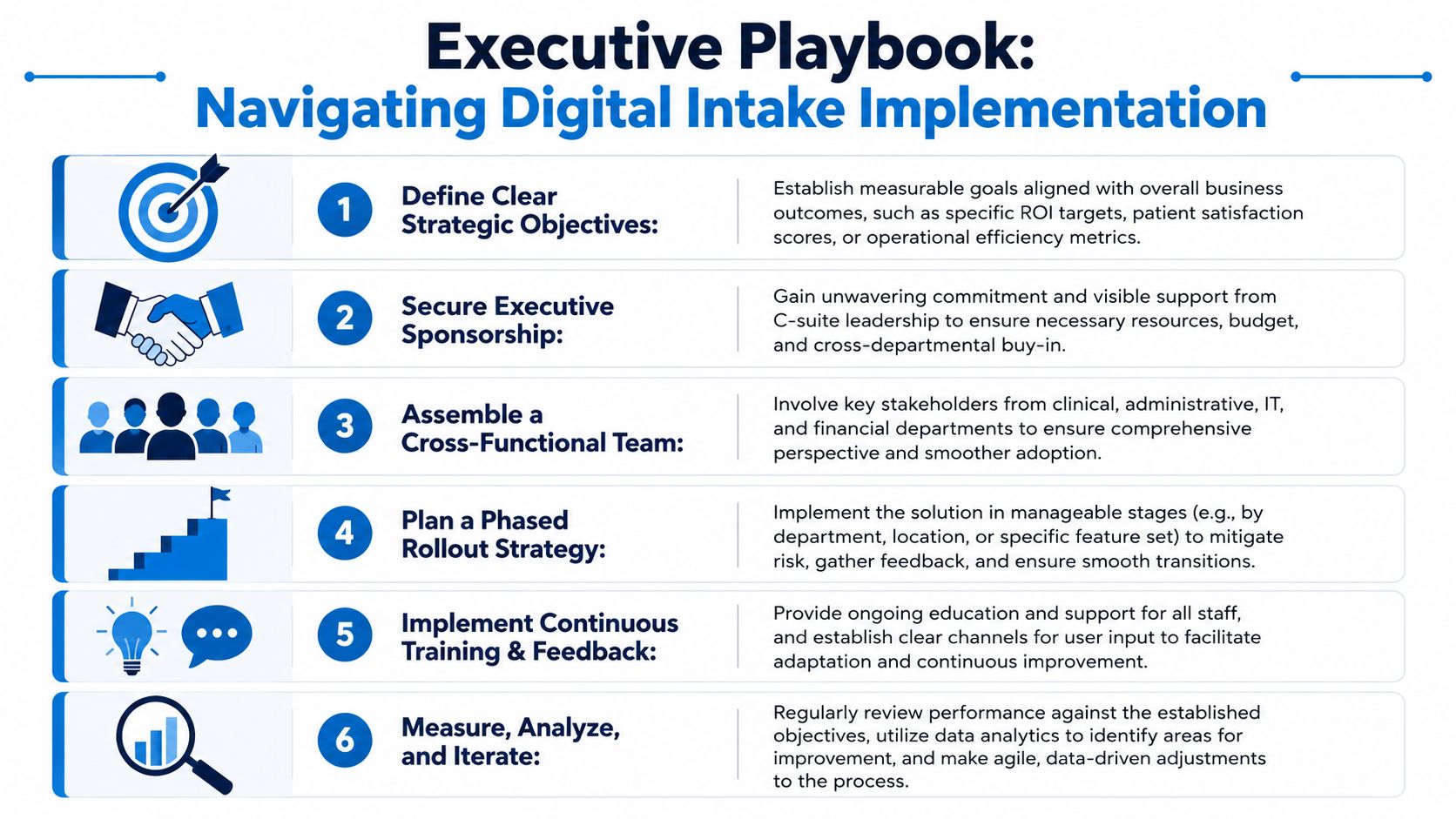
Assign one executive sponsor and one operational owner. If nobody owns patient access, front-desk workflow, billing impact, and technology coordination together, the rollout will drift.
Then bring in the right voices early:
- Front-desk leadership because they know where forms stall and where patients struggle.
- Billing leadership because they see the downstream cost of bad registration.
- Clinical operations because intake has to support rooming and provider prep, not just registration.
- IT or interface support because system sync and security decisions can't be improvised.
The most important early step is process mapping. Document exactly how appointments are scheduled, when forms are sent, how reminders work, what staff review before the visit, and where exceptions go. Most practices discover they have several unofficial intake workflows running at once.
Roll out in phases and force accountability
Don't launch enterprise-wide on day one. Start with a contained pilot such as one specialty, one location, or one provider group. That gives you a manageable environment to refine forms, routing, and staff responsibilities before expansion.
Use a short implementation scorecard with practical questions:
| Implementation area | Executive question |
|---|---|
| Workflow | Did we remove steps or just digitize them? |
| Staff adoption | Are staff using the system consistently or creating workarounds? |
| Patient completion | Are patients finishing forms before arrival? |
| Billing impact | Are registration-related issues reaching the back end less often? |
| Governance | Who resolves exceptions and updates forms? |
Training also needs to be ongoing. Front-desk staff need scripts for incomplete submissions, kiosk fallback, duplicate records, and insurance exceptions. Billing staff need visibility into what intake captured and how it entered the account.
A rollout is successful when operations become simpler, not when the project goes live on schedule.
How to Choose the Right Digital Intake Partner
The wrong buying approach is to compare form templates and texting features, then pick the cheapest option. That's how organizations end up with a tool staff tolerate but finance never feels.
Buy RCM competence, not a prettier form builder
A serious vendor should understand patient access, eligibility, registration accuracy, and billing consequences. If the sales team talks only about convenience and patient satisfaction, they're selling to operations, not to the enterprise.
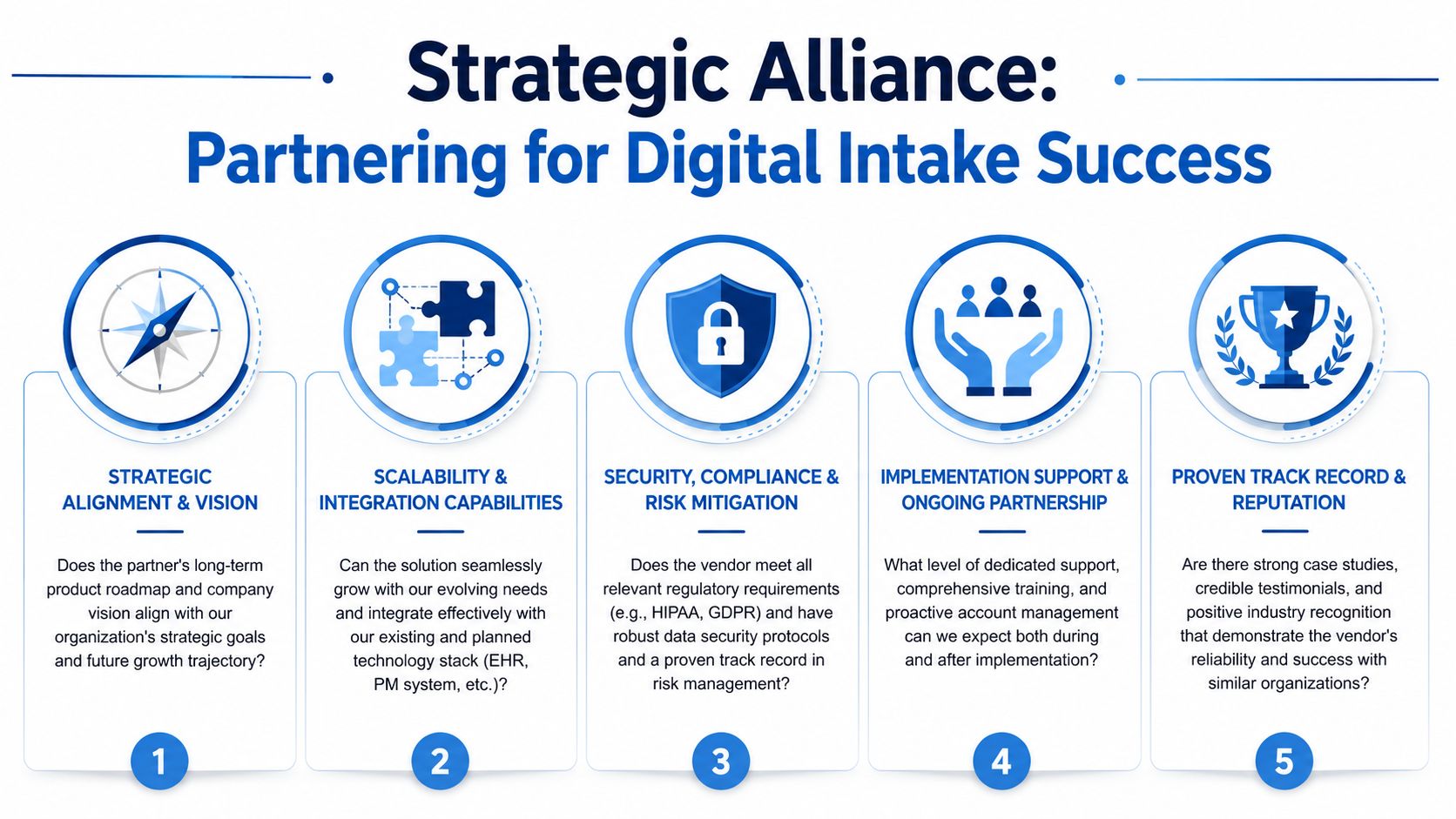
Evaluate partners on five dimensions:
- RCM understanding: Can they explain how their product helps prevent eligibility errors, registration defects, and downstream rework?
- Integration depth: Can they demonstrate discrete write-back into your EHR and practice management environment?
- Security and compliance maturity: Will they support the controls, auditability, and accessibility your organization requires?
- Implementation support: Do they provide a real rollout plan with accountable resources, or are they handing you software and a help center?
- Long-term fit: Will the platform still work as your locations, specialties, and workflows expand?
If you're comparing broader healthcare RCM companies, use the same discipline here. The best partner understands that intake quality affects collections, denials, and cash flow downstream.
Questions worth asking in every demo
Skip generic demo questions and ask these instead:
- Show me exactly where patient data lands in the EHR.
- Show me how staff identify incomplete or inconsistent submissions.
- Show me how insurance information is captured and reviewed before the visit.
- Show me the audit trail for consents, edits, and user access.
- Show me how the experience works for patients who need accessibility accommodations or language support.
A good vendor will answer with workflow and proof. A weak vendor will answer with promises.
The right digital patient intake software doesn't just improve arrival experience. It strengthens the first financial checkpoint in your revenue cycle.
If your organization is trying to reduce front-end errors, tighten eligibility and registration workflows, and improve the financial performance of the revenue cycle, Clarity can help. We work with providers to identify operational gaps, strengthen intake-to-billing processes, and build a cleaner path from patient access to payment through personalized RCM support.
No responses yet