
You know the scene. It's Monday, the denials queue is full, the aging report won't move, and your billing team is stuck reworking the same claims instead of cleaning the next batch. That's not a software problem by itself. It's a cash-flow problem, and medical claims processing software only helps if it fits the way your front end, coding, adjudication, and follow-up work.
For a CFO or practice owner, the wrong question is, “Which platform has the most features?” The better question is, “Which setup gets claims out cleanly, posts payment fast, and doesn't create a bigger maintenance burden than it solves?” That's where software, workflow discipline, and outsourced RCM support all collide.
Table of Contents
- The Day a Claims Backlog Costs You More Than Software
- What Medical Claims Processing Software Actually Does
- Core Features That Move Cash Versus Features That Look Good in a Demo
- How a Claim Moves Through the Software Step by Step
- Why Software Will Not Fix a Broken Front End
- Buying the Software Versus Partnering With an RCM Service
- How to Evaluate Vendors and Calculate ROI
The Day a Claims Backlog Costs You More Than Software
The failure pattern is predictable. Claims pile up, staff recheck eligibility by hand, and denials bounce between the billing desk and the front office because no one owns the full workflow. At that point, software isn't the hero, it is the tool that either reinforces a broken process or gives your team a cleaner path.
Claims software sits in the middle of the revenue cycle
Medical claims processing software sits in the operating layer between patient intake, coding, payer submission, remittance, and denial follow-up. Mordor Intelligence valued the broader healthcare claims-management market at USD 27.72 billion in 2025 and projected USD 67.78 billion by 2031, with software accounting for 62.65% of spending in 2025 and cloud deployments at 59.05% of share, growing at 18.40% CAGR (Mordor Intelligence). That is a clear signal that claims software is no longer a side tool, it is the main technology layer for claims operations.
That shift matters because the market has already moved toward cloud delivery and modular workflow. The old idea that claims processing is just “billing software” is too small. The decision is whether your organization wants to run a claims stack, rent one, or let a partner operate parts of it.
The operative question is operating model, not feature count
Finantrix says health insurers process $2.1 trillion in claims annually, and reports modern SaaS claims systems can produce 35 to 45% reductions in claims processing costs and 60% faster adjudication times versus legacy mainframe environments. The same source cites an 18-day industry average claims cycle time and a 94% auto-adjudication rate in top-tier implementations (Finantrix). Those numbers matter, not because you should assume your organization will hit them, but because they show the stakes are operational, not cosmetic.
Practical rule: if a platform does not shorten intake-to-submission, submission-to-adjudication, or adjudication-to-posting, it is not helping cash flow. It is just adding another screen.
A platform purchase only pays off when the front end is disciplined, the claim rules are clean, and someone is managing denial work. If those pieces are weak, buying more software just gives you a faster way to process bad habits.
This guide takes a different path from the usual feature catalog. It focuses on what claims software does, which functions move money, what must already be working before automation pays off, and where an outsourced RCM partner like Clarity fits better than buying another system.
What Medical Claims Processing Software Actually Does
Think of claims software as air traffic control for claim files. It doesn't create the plane, and it doesn't own the runway, but it does coordinate the sequence so claims don't collide, stall, or disappear into manual work queues. The better systems separate business logic from infrastructure and let different modules handle intake, edits, submission, remittance, and denial work without tying everything to one fragile deployment layer, which mirrors the enterprise claims architecture CMS uses for Part A and Part B processing (CMS enterprise claims-processing architecture).
It is a stack, not a single product
A real claims platform usually includes intake and capture, coding validation, scrubber logic, electronic submission, adjudication tracking, remittance posting, denial routing, and analytics. If one of those layers is weak, the whole stack slows down. That's why buyers should stop asking whether a demo “has claims management” and start asking which part of the workflow it controls.
The architecture matters because claims systems have to talk to billing, EHR, clearinghouse, and enterprise reporting systems without forcing every workflow into one monolithic tool. Separate modules let you replace weak components without tearing up the whole operation. They also make it easier to scale when patient volume rises or payer rules change.
Visual features are not the same as working features
The claim lifecycle tells you where the software earns its keep
If you can map the workflow cleanly, you can judge the product fairly. A claims stack should reduce rekeying, catch errors before submission, and keep denials from becoming a second full-time job. If it doesn't do those things, it's not really claims software, it's reporting wallpaper.
Claims platforms win when they remove handoffs, not when they add prettier dashboards.
Core Features That Move Cash Versus Features That Look Good in a Demo
A vendor demo can make almost any system look smart. Your job is to ignore the theater and ask which module changes the claim before money leaves the practice. The useful features are the ones that touch the claim before submission, during payer review, or after remittance, because those are the points where cash is won or lost.
Revenue-driving features do actual work on the claim
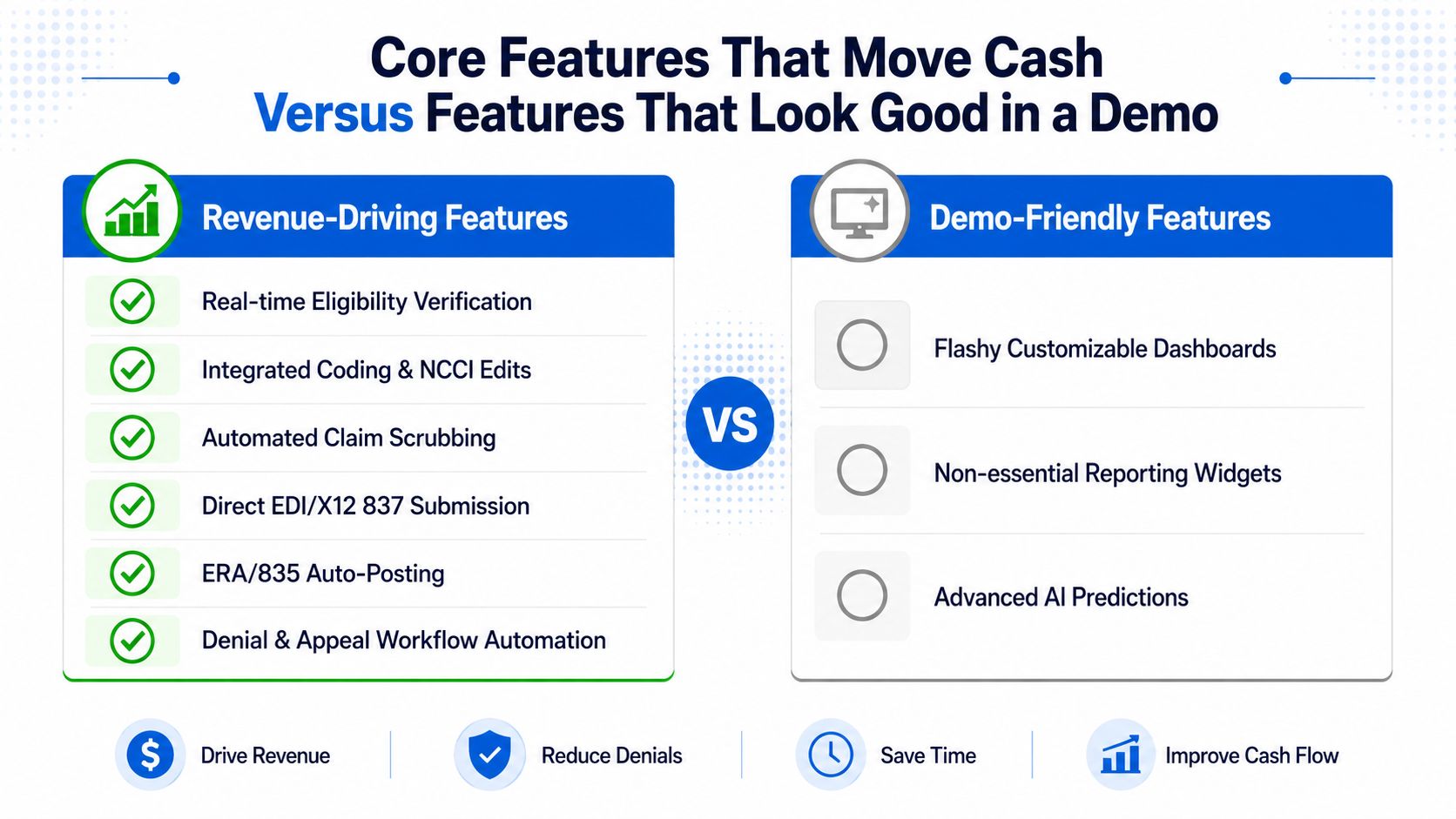
Eligibility verification is the first serious filter. If coverage is wrong, the rest of the workflow is already contaminated. Integrated coding and NCCI edits matter because they catch mismatched procedures and bundling issues before the claim reaches the payer. Claim scrubbing is the safety net, but only if the rules are current and payer-specific.
EDI/X12 837 submission and ERA/835 auto-posting are not luxury features. They're the plumbing that keeps the claim moving and the payment posting from becoming a manual reconciliation exercise. Denial and appeal workflow automation closes the loop, because every denial that gets routed cleanly is one less claim sitting in a spreadsheet.
Demo-friendly features can still be useful, but they rarely move collections alone
Flashy dashboards, generic reporting widgets, and overly broad AI claims often look strong in a demo and weak in daily operations. They can help managers see patterns, but they don't prevent a bad claim from leaving the building. Same with patient-facing bells and whistles, nice to have, not enough on their own to justify the buy.
The best evaluation question is simple. Does this feature help the claim survive intake, coding, submission, adjudication, or posting? If the answer is no, it probably belongs in the “nice but optional” bucket.
Use the workflow stage as your buying filter
Here's the practical way to assess any module:
- Before submission, ask whether it improves data capture, eligibility, or coding accuracy.
- At submission, ask whether it reduces formatting errors and payer rejection risk.
- After submission, ask whether it speeds remittance posting and denial follow-up.
If a feature doesn't clearly fit one of those stages, don't pay for it as if it does. That's how practices end up with expensive systems that look modern and still leak cash.
How a Claim Moves Through the Software Step by Step
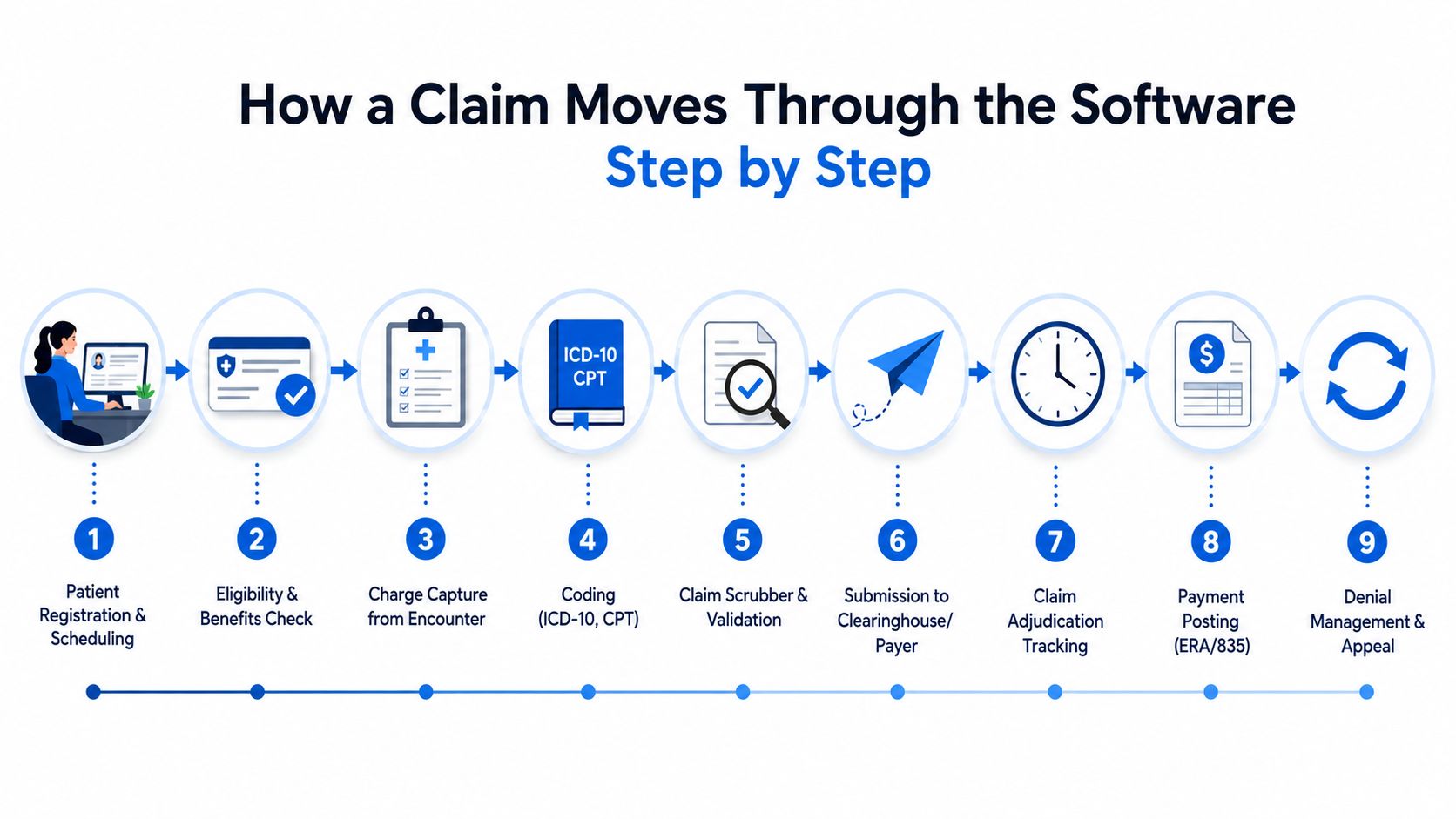
A good system turns a messy paper trail into a predictable sequence. The ideal flow starts with registration, eligibility, and charge capture, then moves through coding, scrubber validation, submission, payer adjudication, ERA posting, and denial handling. If you need a mental model, use the Clarity revenue cycle flowchart as a reference point for how the work should move across functions: healthcare revenue cycle flowchart.
The first half of the claim should be boring
Patient registration should feed clean demographic and insurance data into the system. Eligibility and benefits checks should happen before services are rendered whenever possible. Charge capture and coding should land in a queue where rules engine checks can catch obvious errors, duplicates, and missing information before the claim leaves your control.
That early-stage discipline matters because the system can only validate what it receives. If the front end is inconsistent, downstream automation processes bad input faster. Faster bad input is still bad input.
Event-driven pipelines make unstructured paperwork usable
Modern implementations increasingly use event-driven, serverless, or microservices patterns to process claims documents in stages. In one AWS reference implementation, scanned claim documents are ingested through S3 events, routed through SQS queues, OCR'd with Textract, then passed to Amazon Comprehend Medical for entity extraction (AWS claims processing example). That sequence matters because it creates a deterministic path from unstructured documents to structured claim data.
The point isn't to chase trendy architecture. The point is to cut transcription errors and remove the human bottleneck around manual document handling. When the pipeline is stable, your staff spend less time retyping what was already on the page and more time reviewing exceptions.
AI belongs in the exception queue, not in the driver's seat
There's a real place for AI-assisted denial prediction and appeal automation. There's also a hard limit. Independent commentary warns that legacy scrubbers can't read unstructured clinical notes well, that specialty and payer-specific training data matter, and that governed AI with human review queues is safer than pretending full automation is ready for everything (Intellivon).
Short version: let automation sort, extract, and flag. Let humans decide the edge cases, the specialty exceptions, and the compliance-sensitive calls.
If your platform claims it can remove humans from claims work entirely, be skeptical. The win is fewer manual touches, not zero oversight.
Why Software Will Not Fix a Broken Front End
A claims platform cannot rescue a practice with a broken intake process. If patient demographics are wrong, authorizations are skipped, and charge capture varies by provider or location, the software just moves bad data faster. The core question is not which features look strongest in a demo. It is whether the front end is stable enough for software to improve cash flow at all.
Stabilize intake before you chase deeper automation
A strong front end starts with forms, attachments, and authorization checks, and it also depends on clean patient-facing workflows. A review of digital patient intake software belongs here because intake errors usually begin before the claim is ever created. Only after those basics are reliable should you push deeper into EHR integration and denial analytics. Practical guidance on claims automation guidance treats the stack as connected prerequisites, not as a single purchase.
If your team cannot collect the right insurance data every time, no scrubber will save you. If documentation is incomplete, no dashboard will make the claim clean. If payer-specific rules are not maintained, denials will keep showing up and staff will keep calling them random.
Run this self-check before you sign a contract
- Master data quality: Are patient demographics, insurance details, and provider records clean enough to trust?
- Front-end discipline: Are eligibility checks and authorization steps done consistently, or only when staff remember?
- Charge capture consistency: Do clinicians and coders enter the same service the same way every time?
- Rule maintenance: Do you have a person or team assigned to payer edits, code updates, and workflow changes?
- Exception handling: Can you identify where claims break most often, or does every department blame the others?
If you cannot answer those questions cleanly, software alone will not fix the leak. Fix the process first, then automate what is already under control.
A CFO or practice owner should treat broken intake as a warning sign, not a buying signal. Vendors will happily sell into confusion because it makes weak operations look like a software problem. Clean the data, standardize the handoffs, tighten the authorizations, then buy the tools.
Buying the Software Versus Partnering With an RCM Service
This isn't a feature decision, it's an operating-model decision. You can run claims software in-house, pair software with outsourced support, or hand more of the cycle to a revenue cycle partner. The right answer depends on how much control you want, how much maintenance you can support, and whether your team can keep payer rules current without burning out.
Three operating models, three different trade-offs
| Dimension | In-House Software | Hybrid with Outsourced Support | Outsourced RCM Partner |
|---|---|---|---|
| Control | Highest internal control over workflows and data | Shared control, internal team keeps oversight | Lower day-to-day control, partner runs more of the work |
| Staffing burden | Highest, your team owns maintenance and follow-up | Moderate, vendor and external staff absorb some tasks | Lowest internal burden |
| Speed to value | Slower if implementation and training are weak | Faster if the partner handles setup and backfill | Fastest when the partner already has the process model |
| Payer-rule upkeep | You own it all | Shared responsibility | Mostly handled by the partner |
| Best fit | Large teams with strong rev cycle leadership | Practices that want control but need relief | Teams that need execution more than software ownership |
When each model makes sense
In-house software wins when you have disciplined revenue cycle leadership, stable workflows, and staff who can manage payer maintenance without constant escalation. Hybrid wins when you want to keep control but need help with verification, posting, or follow-up. Full outsourcing wins when the practice wants fewer internal moving parts and cares more about clean cash flow than owning the platform.
Clarity fits as an RCM partner rather than just another tool, and it offers fee schedule and practice management setup, billing operations support, insurance benefit verification, and claim status and payment posting as either full-cycle support or a la carte help. That makes it relevant when the software purchase alone won't solve staffing gaps or process gaps. I'd treat it as a service option alongside platform ownership, not as a replacement for operational discipline.
If your team is already stretched thin, adding software without adding process support usually just adds a second problem.
The blunt recommendation is this. Buy software if you need a system. Buy services if you need execution. Buy both only when you've already cleaned up the front end and know exactly which bottleneck is costing you cash.
How to Evaluate Vendors and Calculate ROI
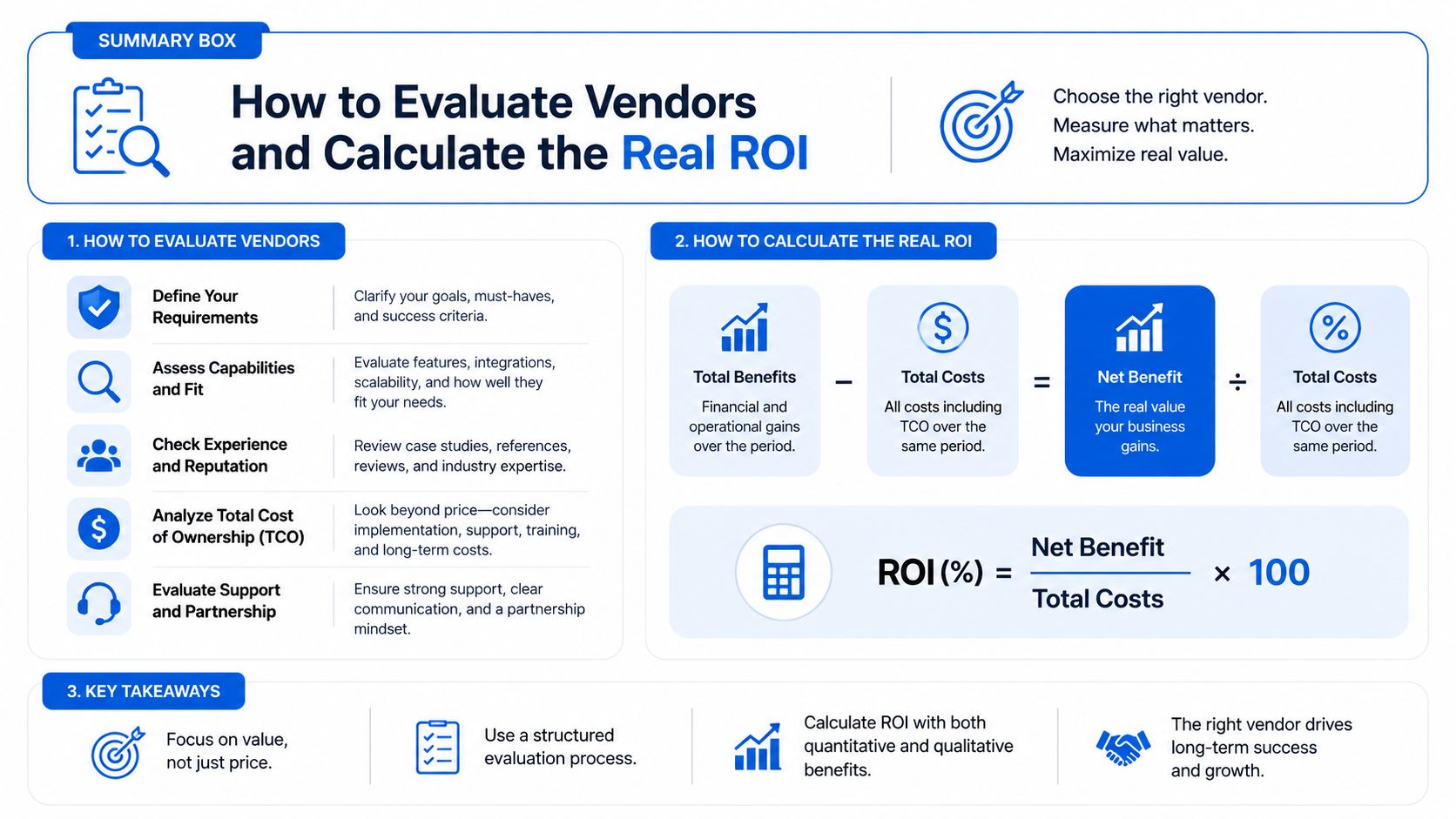
Start with security and interoperability, not polished screens. A claims platform handles sensitive financial and clinical data, so HIPAA posture, access controls, audit trails, and clean integration with EHR and clearinghouse systems should be part of the first conversation. If the vendor cannot explain how the system fits your current workflow, it is not ready for your environment.
Ask about the full stack, not the sales demo
Use this checklist in every demo, and pair it with an overview of healthcare RCM software options so you can compare platform features against operational reality:
- Security posture: Ask how the vendor handles access control, logging, and protected health information.
- Compliance and auditability: Ask how edits, approvals, and denial actions are traced for review.
- Interoperability: Ask how the system connects with your EHR, clearinghouse, and remittance workflow.
- Maintenance model: Ask who updates payer rules, claim edits, and workflow logic.
- AI safeguards: Ask what data the model is trained on, where human review happens, and how audit trails are preserved.
That last point matters more than most vendors want to admit. AI can help with denial prevention and document extraction, but you want governed automation, not a black box that creates compliance risk.
Calculate ROI from your current baseline
Do not let a vendor hand you a generic savings promise. Start with your current denial rate, days in accounts receivable, and cost-to-collect, then estimate how much improvement a specific workflow change could realistically produce. If the software shortens submission delays, improves auto-posting, or reduces rework, that has value. If it only creates cleaner-looking reports, it probably does not.
The market context supports that discipline. Claims software has become the dominant technology layer for claims operations, and cloud deployment is now the standard model for scale and data exchange, as noted earlier in the article and in broader market coverage from Mordor Intelligence. That does not mean every cloud system is right for you. It means your evaluation should assume this baseline and focus on whether the vendor improves cash flow in your actual workflow.
Make the first move practical
Use a complimentary consultation to review your current revenue cycle before you commit to a platform or a services contract. If the bottleneck is intake, fix intake. If the bottleneck is claim follow-up, add support there first. If the bottleneck is everywhere, choose the model that removes the most friction fastest, not the one with the slickest demo.
If your claims process is leaking cash, stop shopping for more screens and start evaluating the workflow. Clarity can review your current revenue cycle, identify where software fits, and show where outsourced support makes more sense than another platform purchase. Visit Clarity and ask for a consultation that focuses on the claims bottleneck costing you the most money.
No responses yet